Click-to-chat ads and WhatsApp inquiries can bring in a lot of leads—yet many don’t convert because typing is slow, questions are complex, or prospects lose urgency. The WhatsApp Business Calling API is built for that exact gap: it lets customers and businesses message and call in the same WhatsApp thread, so the conversation stays continuous instead of fragmented.
- What the WhatsApp Business Calling API Actually Enables?
- Why Calls Convert Better Than Chat for High-Intent Leads?
- The New Conversion Playbook (Step-by-Step)
- Step 1 — Design your “Call Moment” (the trigger)
- Step 2 — Capture intent in chat (fast qualification)
- Step 3 — Offer the call (make the user feel in control)
- Step 4 — Permission + policy-safe calling (non-negotiable)
- Step 5 — Route the call like a pro (sales/support)
- Step 6 — Run a “WhatsApp-first” call structure (7 minutes)
- Step 7 — Post-call follow-up that increases close rate
- Compliance Checklist (So You Don’t Get Blocked or Reported)
- Metrics That Prove the WhatsApp Business Calling API Is Working
- Want a working WhatsApp Business Calling API playbook for your brand—
- Conclusion
- FAQ’s
- What is the WhatsApp Business Calling API?
- Can businesses call any WhatsApp user anytime?
- How do click-to-chat leads become calls?
- Does WhatsApp require opt-in for calls?
- What are common restrictions for business-initiated calling?
- Is the WhatsApp Business Calling API available in all countries?
- What’s the best use case for the WhatsApp Business Calling API?
- How do we measure ROI from WhatsApp calling?
In this playbook, you’ll learn how to use the WhatsApp Business Calling API to:
-
- identify the “call moment” (when a lead is most likely to convert),
- request permission the right way,
- route calls to the right team,
- follow up inside WhatsApp for higher close rates,
- and stay aligned with opt-in and policy requirements.
What the WhatsApp Business Calling API Actually Enables?
The WhatsApp Business Calling API is a calling capability on the WhatsApp Business Platform that enables voice calls inside WhatsApp conversations—so a customer can chat, call, and continue messaging with all context intact. WhatsApp positions this as a way to create an “end-to-end” journey inside one thread.
Two calling modes you can use
-
User-initiated calls (customer calls you)
-
You can allow customers to call from the WhatsApp thread and manage the call experience (accept/reject/terminate).
-
-
Business-initiated calls (you call the customer)
-
Outbound calls require a permission flow—WhatsApp emphasizes requesting permission for business-initiated calling.
-
Built-in controls that matter for conversion
WhatsApp highlights practical controls like:
-
- enabling/disabling the call icon,
- setting business hours,
- click-to-call buttons and call deep links,
- and interactive call templates with a time-to-live concept.
This is important: the WhatsApp Business Calling API isn’t “call anyone anytime.” It’s “call at the right time, with the right permissions.”
Why Calls Convert Better Than Chat for High-Intent Leads?
Some questions are just faster on voice:
-
- pricing/plan comparisons,
- custom requirements,
- objections (“Is this legit?”, “What’s the catch?”),
- urgent needs (“I need it today”),
- complex support troubleshooting.
WhatsApp’s own launch note frames the WhatsApp Business Calling API as a way to handle urgent and high-consideration needs and to accelerate sales cycles with click-to-call experiences.
The New Conversion Playbook (Step-by-Step)
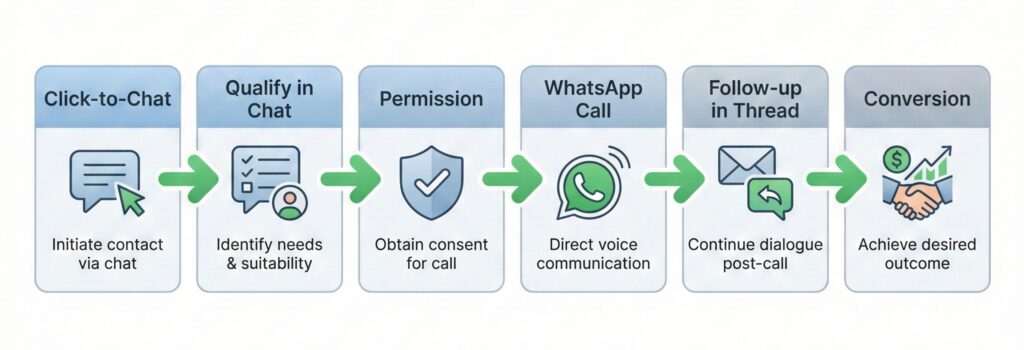
Step 1 — Design your “Call Moment” (the trigger)
Your WhatsApp Business Calling API conversion rate depends on when you call.
Use a call trigger when any of these happens:
-
- Lead asks: “price?”, “discount?”, “availability?”, “call me”
- Lead shares phone + timeframe (“need this week”)
- Lead matches high-value criteria (budget, location, product fit)
- Lead is stuck after 2–3 message exchanges
- Lead has sensitive needs (finance/health/legal-style questions → clarity helps)
Avoid calling when:
-
- customer is only browsing,
- you haven’t confirmed interest,
- the user hasn’t granted permission (for outbound),
- it’s outside your stated calling hours.
Step 2 — Capture intent in chat (fast qualification)
Before you use the WhatsApp Business Calling API, you want a micro-qualification so the call is productive.
Simple chat questions (copy/paste ready):
-
- “What are you looking for—Option A, B, or C?”
- “What’s your city/pincode?”
- “What’s your target timeline—today, this week, or later?”
- “Do you want a quick 2-minute call to finalize?”
This reduces wasted calls, and makes the WhatsApp Business Calling API feel helpful, not intrusive.
Step 3 — Offer the call (make the user feel in control)
People say “yes” when you frame it as convenience.
Best-performing call offer scripts:
-
- “This is easier to explain on a quick WhatsApp call—want me to call you now?”
- “I can share the exact plan & pricing in a 3-minute WhatsApp call. Should I call?”
- “Want to switch to a WhatsApp call so we can finish this faster?”
This is where the WhatsApp Business Calling API shines: the user doesn’t have to switch apps or repeat details.
Step 4 — Permission + policy-safe calling (non-negotiable)
WhatsApp’s Business Policy is clear: you may contact people only if you have their number and you have opt-in permission for messages or calls, and you must respect opt-outs.
On the operational side, partners document specific limits for business-initiated calling permission requests (e.g., frequency limits, expiry rules, missed-call revocation behaviors).
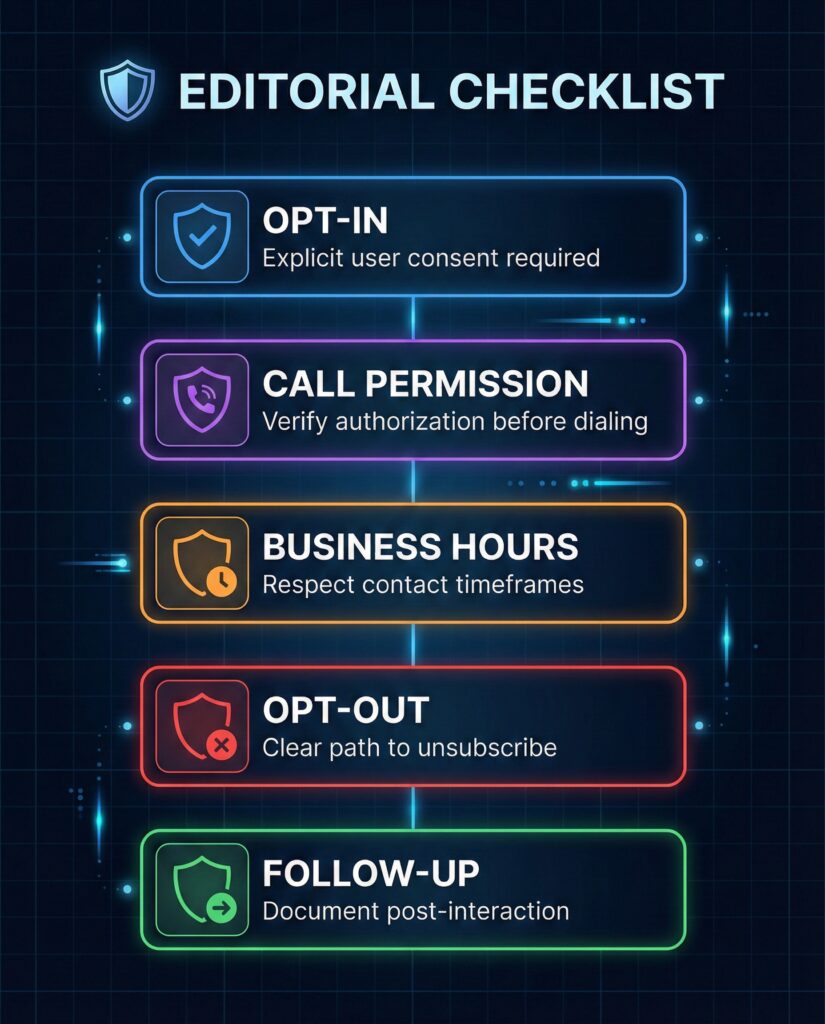
Practical checklist before an outbound WhatsApp Business Calling API call:
-
- ✅ You have consent/opt-in for WhatsApp communications
- ✅ You request call permission correctly
- ✅ You call within your allowed window/limits
- ✅ You clearly identify the business at call start
- ✅ You give an easy “stop calling” path
Step 5 — Route the call like a pro (sales/support)
The WhatsApp Business Calling API becomes a conversion machine when routing is clean.
Routing rules (simple):
-
- High intent + high ticket → senior sales rep
- Support escalation → specialist queue
- Language preference → language-based queue
- Missed call → auto follow-up message + re-offer a call slot
If you already operate a call team, connect the WhatsApp Business Calling API with your helpdesk/contact centre workflow so calls don’t become chaos.
Step 6 — Run a “WhatsApp-first” call structure (7 minutes)
A short structure that works across industries:
-
- Confirm context (15 sec): “You messaged about X. I have your details.”
- Clarify outcome (45 sec): “What would make this a win for you today?”
- Answer + recommend (3–4 min): keep it tight
- Close the next step (1 min): payment link/demo/booking
- Send recap in WhatsApp (30 sec): summary + link + next step
Because the WhatsApp Business Calling API keeps everything in one thread, your recap message feels natural and boosts follow-through.
Step 7 — Post-call follow-up that increases close rate
Don’t end the call and disappear. End the call and finish in chat.
Post-call message template:
-
-
“Thanks! Summary: (1)…, (2)…, (3)…
Next step: [link / booking / doc]. Want me to stay on WhatsApp if questions come up?”
-
This is the “thread advantage” of the WhatsApp Business Calling API—context stays saved.
Compliance Checklist (So You Don’t Get Blocked or Reported)
Must-follow basics
-
- Opt-in is mandatory for messages/calls.
- Respect “stop / unsubscribe / block” requests immediately.
- Use approved templates where required (outside service windows) and follow platform rules.
- Use calling permissions and limits responsibly (especially for outbound calling).
User experience rules (what people actually hate)
-
- calling too soon after “Hi”
- calling repeatedly if missed
- calling outside business hours
- sounding like a robocall
- not explaining why you’re calling
A compliant WhatsApp Business Calling API setup is also a higher-converting setup.

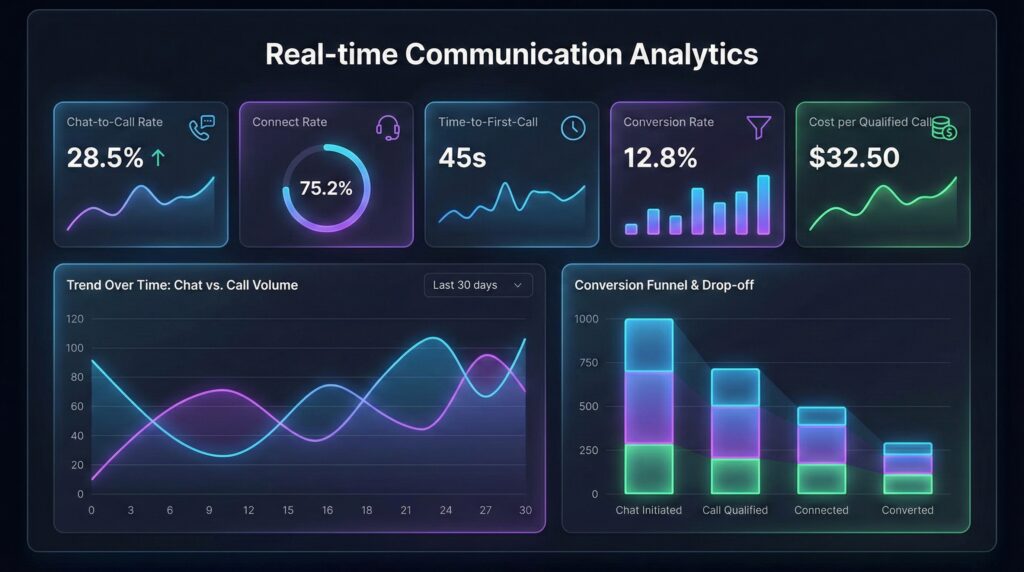
Metrics That Prove the WhatsApp Business Calling API Is Working
Track these weekly:
-
- Chat-to-call rate = calls started / qualified chats
- Call connect rate = connected calls / call attempts
- Time-to-first-call = avg time from first message to first call
- Close rate from calls vs close rate from chat-only
- Cost per qualified call (especially if you run click-to-WhatsApp ads)
- Revenue per conversation (WhatsApp thread)
If these move in the right direction, the WhatsApp Business Calling API is paying for itself.
Want a working WhatsApp Business Calling API playbook for your brand—
Conclusion
The biggest leak in click-to-chat funnels is not traffic—it’s time and friction. The WhatsApp Business Calling API fixes that by letting you keep the thread, keep the context, and move to voice exactly when intent peaks. Start with one queue, one use case, and one follow-up template—then scale once your metrics prove lift.
FAQ’s
-
What is the WhatsApp Business Calling API?
The WhatsApp Business Calling API enables voice calls inside the WhatsApp Business Platform so businesses and customers can switch between messaging and calling in the same thread.
-
Can businesses call any WhatsApp user anytime?
No. Outbound calling uses a permission flow, and opt-in/consent and policy requirements apply.
-
How do click-to-chat leads become calls?
Use chat to qualify (2–4 questions), offer a short call, request permission where required, then call and follow up in the same thread using the WhatsApp Business Calling API.
-
Does WhatsApp require opt-in for calls?
Yes. WhatsApp’s policy states you may only contact people if you have their number and have received opt-in permission for subsequent messages or calls, and you must honor opt-outs.
-
What are common restrictions for business-initiated calling?
Providers document limits around permission requests and calling cadence (frequency limits, expiration rules, and missed-call handling).
-
Is the WhatsApp Business Calling API available in all countries?
Availability can vary by country/provider and Cloud API support, and some regions/countries may be restricted.
-
What’s the best use case for the WhatsApp Business Calling API?
High-consideration sales (pricing/consultation), urgent lead follow-ups, and complex support escalation—when typing slows conversion.
-
How do we measure ROI from WhatsApp calling?
Track chat-to-call rate, connect rate, time-to-first-call, call-assisted close rate, and cost per qualified call—especially for click-to-WhatsApp ad funnels.
Disclaimer:
This article is for informational purposes only and does not constitute legal advice. WhatsApp/Meta policies and product capabilities can change. Always verify your compliance requirements, consent language, and calling rules with the official documentation and your solution provider before launching campaigns.