
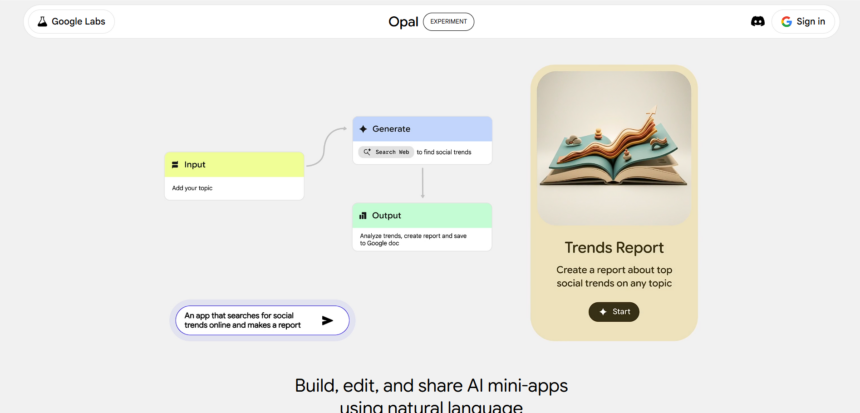
Every new tool begins as a question. Google Opal AI answers that question by blending creativity with logic. It is more than another Google experiment; it is a space where plain language becomes working intelligence. Built as a no-code app builder, it allows people to build, test, and refine ideas through clear visual flows.
Is Google Opal an AI Tool or a No-Code Builder?
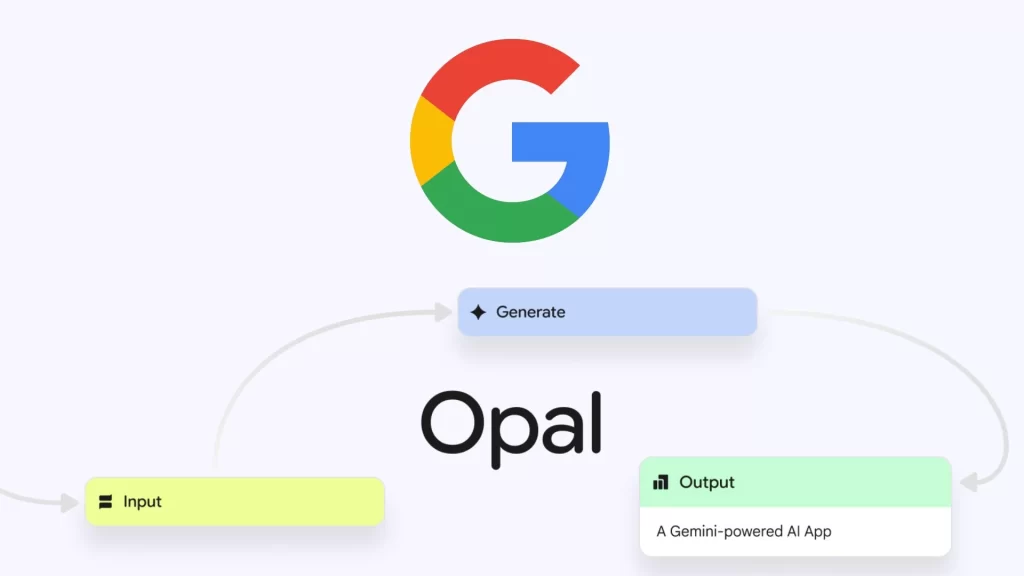
Google Opal AI is both an intelligence tool and a no-code AI builder. It listens carefully when someone describes an idea, and it quietly turns that idea into a functioning structure. The user does not need to write long lines of code. Instead, they write a few clear sentences, and Opal transforms them into actions. It sits between automation and intuition, giving shape to words and meaning to logic.
How Does Google Opal Fit Into Google’s AI Ecosystem?
Opal lives within Google’s wider AI ecosystem, connecting various models that read, write, and generate intelligently. It draws from text, image, and media models within the Gemini framework. Together, they create a space where imagination meets function. Google designed Opal to show how creation and simplification can live side by side. It hides complexity behind a clear interface, while it uses the same technology that powers Google’s AI systems across products like Gemini and Workspace.
What Makes the Canvas Mode So Unique?
The Canvas is where everything comes alive. It turns abstract thought into structured design and lets anyone shape logic through drag-and-drop clarity. In this mode, Google Opal becomes a digital sketchpad for AI workflows—a place where ideas, commands, and creativity meet without code.
How Does Canvas Mode Work in Google Opal?
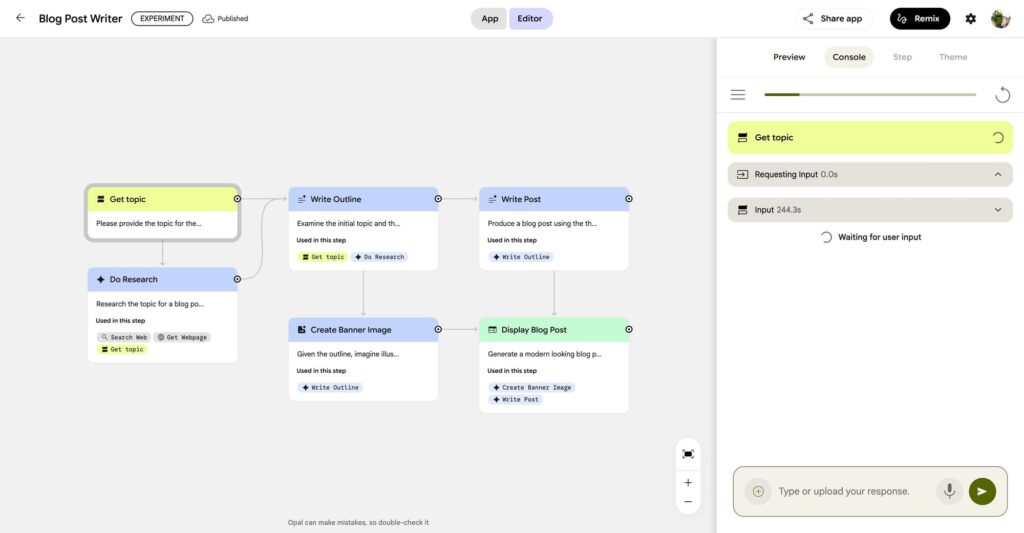
Canvas Mode is where thoughts take shape visually. The screen becomes a creative board filled with blocks that represent each step in a process. One block accepts text input. Another sends it to an AI model. A third displays the result. A user connects these blocks to describe logic, sequence, and purpose. When the sequence runs, the AI interprets it as an instruction. Every block interacts smoothly, giving the experience of digital flow—like visual programming simplified for everyone.
Can Anyone Use the Canvas Without Coding Skills?
Canvas Mode removes the fear of code syntax. Anyone who can type or think in steps can use it. The system keeps complexity hidden, allowing only clarity to appear on the surface. A student can create a note summarizer. A writer can build a content generator. A digital marketer can create a social media automation tool that saves hours. No prior coding experience is needed because the AI canvas already understands the technical structure beneath.
What Kind of Tasks Can Be Automated on Canvas?
Automation begins with imagination. With Opal, users can generate blog content, summarise reports, analyse datasets, and visualise results. It can connect multiple AI models to blend text, image, and sound into one coherent output. Marketers build campaign planners or caption tools. Analysts design quick dashboards that clean and interpret data. Designers use it to prototype interactive experiences. Google Opal Canvas allows each user to automate workflows that reflect their unique purpose.
How Does Google Opal Actually Work?
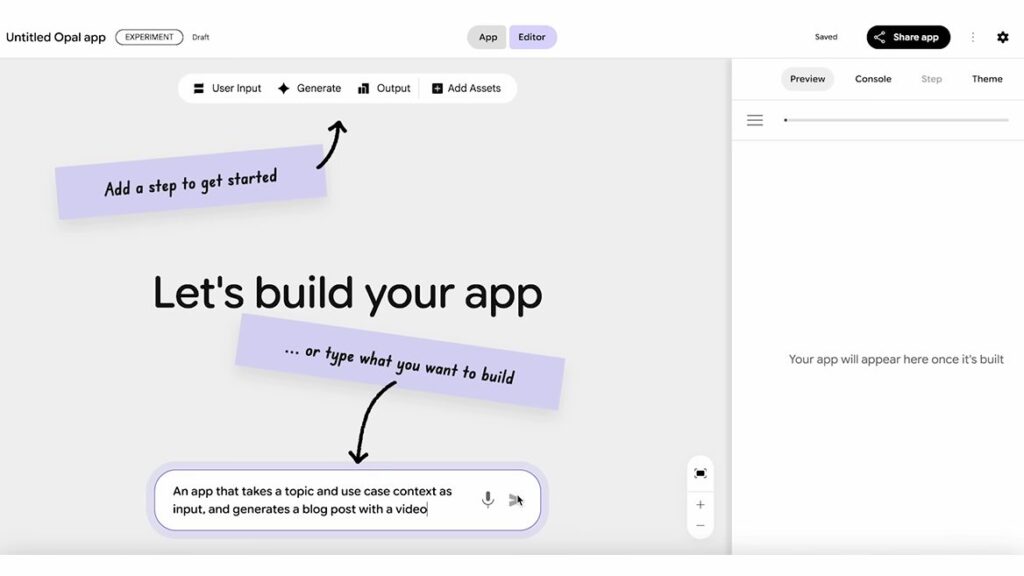
Behind its simplicity, Google Opal runs on quite a complexity. It listens to user intent, interprets language, and builds workflows that connect multiple AI models. Each line of text becomes a small set of actions, forming a digital chain of reasoning that executes with precision and clarity.
What Happens When a User Gives a Prompt?
Everything begins with a sentence. The user writes what they want to build. The AI reads it closely and understands the structure. It identifies key parts of intent, and it translates them into visual blocks. The system then creates a logical flow, mapping every action to its purpose. The result feels like watching language turn into logic.
How Does Opal Turn Plain Text Into an App?
The transformation feels simple yet methodical. The AI analyses the prompt, detects input, processes, and output, and then builds a workflow automatically. The user can refine or rearrange blocks at will. When “Run” is clicked, the tool executes the flow immediately. The final mini-app performs as expected, following each instruction clearly. This approach makes AI app building fast, precise, and accessible. It removes technical clutter and leaves only an intuitive design behind.
Does It Use Gemini or Other Google AI Models?
Yes. Opal uses the same Gemini models that support Google’s AI platforms. These models handle text, vision, and data simultaneously. They combine under Opal’s AI workflow automation system to perform complex, multi-modal tasks in one seamless motion. Users never see the internal processing, yet they experience results shaped by multiple intelligent systems working together.
What Makes Google Opal Different From Other Tools?
Many AI tools assist with thinking; few help with building. Google Opal stands apart because it combines automation, design, and intelligence in one fluid platform. It is not just a chatbot or connector—it is a creative AI workspace that turns input into function and ideas into working systems.
How Is It Different From ChatGPT or Zapier?
Opal does more than answer or connect. It builds. ChatGPT responds with ideas, Zapier connects existing apps, but Opal creates new mini-apps that live within its canvas. It lets you construct AI workflows that analyse, generate, and publish—all inside a single environment. It turns conversation into creation and natural language into automation.
What Features Set Google Opal Apart?
Opal AI stands out through its clarity and design.
- It uses natural language as an interface, turning plain speech into functional systems.
- It provides a visual canvas that blends art and logic.
- It hosts every app securely inside Google Cloud.
- It offers templates and remixable samples for faster creation.
- It enables shareable AI mini-apps that launch instantly with one link.
- It supports text, image, and video generation in one AI workflow.
These features make Google Opal AI a more fluid and human-centred tool than other no-code builders.
Who Can Benefit From Using Google Opal?
Opal was designed for both the curious beginner and the busy professional. Anyone who seeks speed, clarity, and automation can find value in it. From digital marketers automating content workflows to students exploring data analysis, its canvas adapts to every skill level and purpose.
Is Google Opal Made for Beginners or Professionals?
It belongs to both. Beginners find it simple because it removes technical barriers. Professionals use it to test and iterate faster. Developers prototype ideas before building production systems. Writers and marketers use it to automate creative tasks. For one, it is a sketchbook that understands logic. For another, it is a digital lab for AI experimentation.
How Can Businesses and Creators Use It?
Businesses use Opal to automate daily operations. They create AI tools for marketing campaigns, customer support, and content distribution. Creators use it to build small apps that generate or enhance content quickly. Educators design summarizers and interactive learning tools. Researchers build data interpreters and pattern finders. The system frees users from manual repetition and lets them focus on insight and strategy. For digital marketing agencies, Opal becomes a quiet partner that automates campaign research and content planning effortlessly.
What Are Some Fun or Real-World Examples?
Some users built blog generators that produce entire articles from topics. Others built caption tools that create social media text paired with AI images. Analysts made dashboards that clean spreadsheets and summarize data. Designers experimented with AI story builders that mix words and art beautifully. Each example shows how a small idea gains structure within Opal’s clean, interactive environment.
What Are the Main Limitations of Google Opal?
Every innovation begins with boundaries. Google Opal, though powerful, still walks its early path. Some integrations remain unfinished, and its ecosystem still grows. Yet these limits do not diminish its purpose—they simply mark a system learning to evolve beyond its first form.
Is It Still in Beta or Testing Phase?
Yes. Google Opal remains in a controlled experimental phase. Features are still evolving, and new connections are being added. Some integrations are missing, and some workflows may fail under heavy load. Google treats it as a living project that learns from usage. The core is stable, but refinement continues quietly as more people experiment with its AI canvas.
What Challenges Does It Face Right Now?
Opal’s strength is deepest within Google’s ecosystem, but its reach outside is still limited. Third-party API connections and external data exports are under development. Complex enterprise apps with advanced logic still need traditional coding support. Its visual system works best for medium-scale tasks rather than heavy infrastructure builds. Still, that limitation makes it light, fast, and approachable.
Can It Replace Traditional Coding Yet?
Not yet, and it should not try to. Coding offers control and precision that no-code AI builders cannot fully match. Opal occupies a different space—rapid ideation and prototype creation. Developers use it for quick experiments. Non-coders use it for automation. It bridges creativity and engineering without forcing either side to compromise.
Why Does Google Opal Matter for the Future of AI?
Opal represents more than convenience—it signals a quiet shift in creation itself. It turns language into a building material and transforms imagination into digital function. As AI becomes central to how people create, tools like Google Opal will redefine what it means to design, develop, and communicate ideas.
How Could It Change How Apps Are Built?
Opal AI shows how language can become the new code. It lets humans instruct machines with clarity instead of syntax. In the past, a developer needed years to write commands. Now, an idea can translate into a functional workflow in minutes. This shift brings software creation closer to conversation and design. It changes not just what we build but how we imagine building.
What Does It Mean for the No-Code Movement?
Opal marks a turning point for the no-code community. Earlier tools simplified design but left AI outside. Opal brings AI to the center. It adds reasoning, context, and automation to visual development. It expands who can build: marketers, teachers, designers, and analysts now stand beside developers. It encourages a generation of creators who see software as collaboration between human intuition and machine logic.
What’s Next for Google Opal and Its Users?
The future of Opal looks open and collaborative. New templates will emerge, and more AI models will connect. Integration with third-party tools and cloud platforms will likely arrive soon. Opal may grow into a shared ecosystem of user-made AI mini-apps. Each small experiment could become a fully functional application tomorrow. Its growth depends on how creators use it and how Google decides to expand it into business and digital marketing applications.
Final Thoughts: Is Google Opal the Future of Easy AI Creation?
Google Opal AI feels like a quiet door into a new age of creation. It invites curiosity and rewards clarity. It turns thought into structure and language into design. It does not seek to replace human imagination; it aims to extend it. For creators, it opens new ground to test and refine ideas. For learners, it reveals how logic and language can coexist in harmony. Google Opal may not be the final form of AI creation, but it is a significant step toward a world where people build with words instead of code. And in that world, digital marketing, education, and creative development will all speak the same simple language—clarity guided by intelligence.
Disclaimer:

This blog is based on publicly available information, experimental previews, and early user insights about Google Opal. Features may evolve as the platform develops. This article does not represent Google nor provide official technical documentation.
References
- Google AI Blog — Gemini Models Overview
- Opal Google – Official Site
- Google Labs — Opal Experimental Workspace
- Google Developers — Multimodal Reasoning with Gemini
- Google Cloud Blog — AI Workflow Automation
- Google Research Papers — AI Canvas & Agentic Systems









Google Opal sounds like it’s bridging the gap between technical and creative minds. I’m curious to see how it will evolve, especially in terms of user adoption. Could it be a tool for non-techies to create professional-level applications?