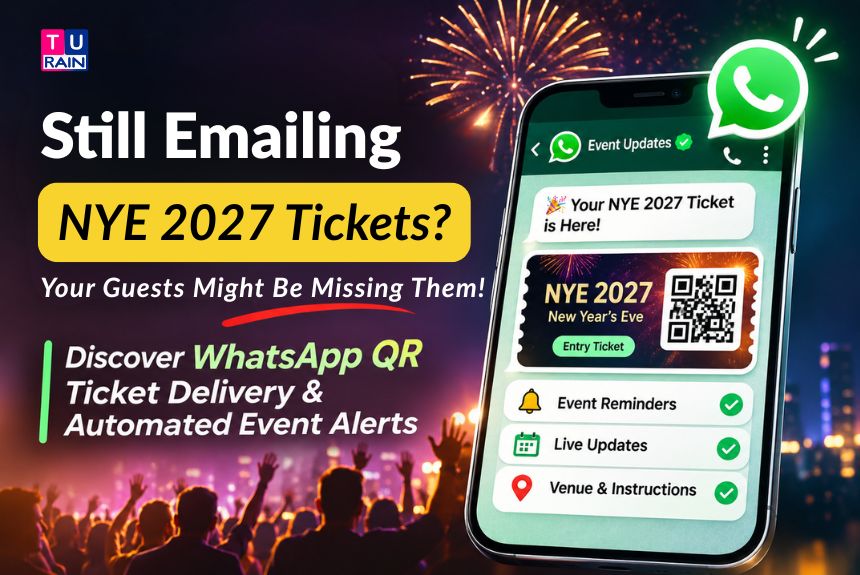
Every November, the same race begins, and it is a busy and exciting time for organisers. Early-bird tickets go live, posters go up, and everyone wants the same thing, which is a full floor on 31st December. Then comes the quiet failure, as a ticket PDF lands in an inbox, buried under bank statements and newsletters. A buyer outside the gate at 11:40 PM, scrolling for it with one bar of signal, is a common and costly picture. That is the email ticketing problem, and it is why more organisers now ask a simpler question: why not send the offer, the alert and the ticket inside the app the customer already lives in? That is where WhatsApp Ticketing Solutions for Events come in, and this guide covers how they work for New Year’s Eve marketing, including message types, setup, costs and the rules that apply in India.
Where Things Stand as of Mid-November 2026
Recent changes are a crucial and practical starting point for organisers, as they affect the budget. Three things matter here.
Billing got stricter on 1st October 2026. Utility templates sent within an open customer service window, free since July 2025, are charged again. So are service messages beyond a free tier of 1,000 per business phone number each month. Meta bills per delivered message, and it doesn’t bill for messages that fail, or for messages customers send to a business.
Prices should hold through NYE. Under Meta’s published pricing calendar, rates can change only on the first day of a quarter, and the next date is 1st January 2027.
An India billing deadline lands on New Year’s Eve. Meta’s billing localisation for India launched on 1st January 2026. Eligible customers, meaning Solution Providers and directly integrated businesses whose Sold-To country is India in Billing Hub, must move every Messaging account to INR by 31st December 2026. From 1st January 2027, Meta stops delivering messages from their non-INR accounts. Eligibility should be confirmed in Billing Hub, or with the provider, and it should be done now, not on the night.
How WhatsApp QR Code Ticketing Works
With WhatsApp Ticketing Solutions for Events, WhatsApp delivers the ticket while the ticketing platform handles validation.
- Template messages: pre-approved and deliverable at any time to people who’ve opted in
- Non-template messages: free-form replies, allowed only inside an open 24-hour customer service window, which opens and resets each time the customer messages the business
This is what trips up first-timers. The QR ticket is a JPEG, a PNG, or a PDF, and once delivered, it never changes. The scan happens on the gate team’s scanner, not inside WhatsApp, so WhatsApp is the delivery route while validation lives in the ticketing system.
What You Need Before You Send a Single Message
Before setting up WhatsApp Ticketing Solutions for Events, organisers need the following essentials
- A WhatsApp Business Platform account, usually through a CPaaS provider, which is the event management CPaaS layer that links the ticketing system to WhatsApp
- A payment method on file in Meta’s Billing Hub
- Opt-in from every person who is messaged
- Approved templates for each message type planned
- A ticketing backend that issues a unique ticket ID per order and validates every scan
- Customer records that can store a BSUID as well as a phone number
One thing is worth knowing early, as Meta only allows messages to users who’ve opted in. Someone who handed over a number to buy a ticket hasn’t automatically agreed to promo alerts, so the question should be asked separately, in plain words, with an unticked box.
Then there is the BSUID. Meta began rolling out optional WhatsApp usernames in mid-2026, and a user who adopts one can hide their phone number from a business, which then sees a Business-Scoped User ID instead. Phone numbers still appear for users without usernames, and for contacts already in the business’s contact book. So every ticket should be keyed to the BSUID too, as a hidden number shouldn’t orphan a booking.
Understanding the Three Message Types Behind an NYE Campaign
Message types are a structured and rule-based system for every campaign, and every message sent falls into one of three buckets. The wrong pick sends costs and approvals sideways.
| Message Type | What It’s For in an NYE Campaign |
| Marketing template | Early-bird launch, price-rise alerts, countdowns, last-call reminders |
| Utility template | Ticket delivery with the QR code, entry time and venue details, tied to a paid order |
| Service message | Replies inside the 24-hour window: parking, dress code, ticket transfers |
The category isn’t the organiser’s call alone, as WhatsApp reviews the content and can reassign it. A utility template must be non-promotional and tied to the user’s own order or transaction. A ticket confirmation fits, as long as it carries only the QR, the venue, and the entry time, but a VIP upsell makes it marketing, and mixed content always is. Here is a detail that catches teams off guard. A template submitted as utility, which Meta decides is marketing, is approved as marketing and billed that way. Repeated misuse of the label can bring a warning, then a restriction on utility templates for 7 days, and for 30 if it continues. So the ticket message carries tickets, and nothing else.
WhatsApp Ticket Automation: The Setup Process
The setup process for WhatsApp Ticketing Solutions for Events varies by provider, though the overall workflow is similar.
- Collect opt-in at early-bird sign-up and at checkout, in separate unticked boxes
- Connect the ticketing platform to the WhatsApp Business Platform through the CPaaS provider
- Write and submit templates: launch alert, price-rise alert and countdown (all marketing), plus ticket delivery (utility). Wait for approval
- Generate a unique, signed token for every paid order and encode it in the QR. Export it as a JPEG or PNG under 5 MB, or as a PDF (documents go up to 100 MB)
- Trigger the ticket template from the payment-success event, never before it
- Save the BSUID and phone number against the ticket record
- Test on Android, iPhone and WhatsApp Web, then run a full gate dry run with real scanners
That last step deserves its own section, as it is where ticketing succeeds or fails.
The Gate Scan: Where “Dynamic” QR Tickets Earn the Name
In WhatsApp Ticketing Solutions for Events, dynamic QR codes rely on server-side validation rather than changing the image after delivery.”
- Each QR carries a unique, signed token. No names. No phone numbers
- Scanners check the token against the server, or against a list synced before doors open
- The first valid scan wins. A second scan shows “already used,” with the time of the first
- Cancelled or re-issued tickets stop working instantly
Screenshots and forwards carry the same token, so whoever scans first gets in. A proper transfer flow that voids the old ticket and issues a new one should be built, instead of letting people forward images around. A QR that refreshes every few seconds has to live on a hosted page, opened from a URL button, as a message image can’t do it. And since NYE crowds can strain mobile networks, the valid-ticket list should be synced to the scanners before doors open. None of this is brand new. In September 2017, BookMyShow joined WhatsApp’s business pilot and made WhatsApp a default ticket-confirmation channel, sending a confirmation text or an M-ticket QR code, and it sent an email alongside.
What It Costs: The Mechanics
Rates vary by market and category, so the live India rate card should be pulled from Meta instead of trusting any blog, and this one is included. Here is how charges work.
- Meta charges per delivered message, by category and the recipient’s country code
- Marketing and utility carry separate rates
- Volume tiers apply to utility and authentication messages only, not marketing
- Messages from customers to a business are never charged
- The first 1,000 service messages per business phone number each month are free
- Inside a free entry point window, marketing, utility, authentication and service messages aren’t charged
That last one is worth building around, as it can save a lot of money for busy campaigns. When someone taps a Click-to-WhatsApp ad and messages the business, a service window opens. Replies within it can keep a free entry point window open for up to 7 days, and if the buyer pays inside that window, the ticket delivery is free too. It only works for people on the Android or iOS app, not WhatsApp Web or desktop.
Pacing Your Early-Bird Rounds
WhatsApp Ticketing Solutions for Events can support early-bird launches, price-rise notifications and last-call reminders for opted-in customers.
- Marketing category only
- An image or video header
- An offer headline of up to 16 characters (“Early Bird Ends” fits)
- An optional countdown timer, with the expiry set at send time, so each tier can carry its own deadline
- A copy-code button (code up to 15 characters), required when an expiry is set, plus a URL button
- No footer
The timer’s text can’t be customised, and it turns red when the offer is within an hour of expiring. It may also not display properly on WhatsApp Web or desktop, so the deadline should be written into the body text too. The URL button accepts a variable, so each recipient’s link can open a checkout with the tier and code already filled in. That is the basis of a zero-friction checkout, which means one tap from alert to payment page.
Now comes the ceiling that organisers don’t control. Meta limits how many marketing templates a person receives across all businesses, and the limit adapts to the recipient’s recent read rate on marketing messages and how busy their inbox is. Meta doesn’t publish a fixed number. Blocked messages return error 131049, and Meta advises waiting at least 24 hours before resending, though a retry may fail again. Utility and authentication messages aren’t affected, so ticket delivery is safe, but alerts aren’t. Fewer, sharper messages beat a daily drip..
WhatsApp Event Marketing Compliance in India
Two frameworks are a crucial and important guide for an NYE launch in India. This is general information, not legal advice.
Dark patterns. The CCPA notified its Guidelines for Prevention and Regulation of Dark Patterns on 30th November 2023. They apply to platforms systematically offering goods or services in India, plus advertisers and sellers, and they list 13 specified patterns. Three matter here.
- False urgency: falsely stating or implying urgency or scarcity to push an immediate purchase
- Drip pricing: revealing price elements late in the buying flow
- Basket sneaking: adding extras to a purchase without clear consent
Enforcement is real. In a written reply to the Rajya Sabha, reported in August 2026, the government said the CCPA had penalised nine platforms, BookMyShow among them. BookMyShow was directed to stop auto-adding a pre-selected charitable contribution to ticket bookings. In practice, a countdown should match a real deadline, and the price should actually change when it ends. If the deadline moves, the earlier claim stops being true, and a “last 50 tickets” line should be true. The full price, fees, and GST included, should be shown from the first screen, and add-ons should not be pre-ticked.
Data consent. The DPDP Rules were notified in November 2025 and are being phased in. Consent-manager provisions begin in November 2026, and the main obligations, including notice and consent standards, apply from May 2027. NYE 2026 falls inside the transition, so an opt-in flow built properly now won’t have to be rebuilt in spring.
Planning your NYE ticket launch on WhatsApp? Talk to Turain‘s messaging team about template approvals, QR ticket delivery, and gate-scan integration before the 31st.
Disclaimer
Platform Billing & Legal Compliance Notice: The WhatsApp Business API billing structures, template categorization rules, and countdown timer limitations discussed in this article reflect Meta's official policies as of November 2026, including the strict requirement for India-based businesses to transition to INR billing by December 31, 2026. Messaging costs are subject to change based on Meta's quarterly rate card updates. Furthermore, executing ticket sales and deploying urgency-based marketing in India must strictly adhere to the Central Consumer Protection Authority’s (CCPA) Guidelines on Dark Patterns (2023). Claiming "false urgency" or utilizing "drip pricing" can result in regulatory penalties. The collection of phone numbers and Business-Scoped User IDs (BSUID) must also comply with the Digital Personal Data Protection (DPDP) Act.
Frequently Asked Questions
Do I still need email?
Email should be kept as a backup. WhatsApp should be treated as the primary delivery channel, and email as the fallback for buyers who aren't on WhatsApp or haven't opted in.
Can I send the QR ticket without a template?
Only inside an open 24-hour customer service window. Outside it, ticket delivery has to go through an approved template.
Does WhatsApp scan the QR code?
No. The gate team's scanner, or the ticketing app, validates it. WhatsApp only delivers it.
Will the countdown timer work on WhatsApp Web?
It may not display properly. It should be tested, and the deadline should be put in the body text as well.
What happens if we don't switch our Meta Billing Hub account to INR by December 31?
If your business is integrated directly or through a Solution Provider with a Sold-To country of India, Meta will completely halt the delivery of all your WhatsApp messages starting January 1, 2027, if your account is not transitioned to INR. Do not wait until New Year's Eve to execute this change; verify your account currency in the Billing Hub immediately to avoid a total blackout during your event.
Can we send a VIP table upsell message along with the QR code ticket?
No. Meta's AI strictly categorizes message templates. A ticket delivery message qualifies for the cheaper "Utility" rate only if it strictly contains the transaction details (the QR code, venue, and entry time). If you add promotional text like "Upgrade to a VIP table," Meta will reclassify the entire message as "Marketing" and charge you the higher premium rate.
What is Error 131049, and why are our early-bird alerts failing?
Error 131049 indicates that Meta has blocked your marketing template because the user has reached their frequency cap. Meta dynamically limits how many marketing messages a user receives across all businesses to prevent inbox fatigue. If you hit this error, Meta advises waiting 24 hours before retrying, though you should focus on sending fewer, higher-quality alerts rather than daily blasts.
How does WhatsApp handle "Dynamic" QR tickets if the image cannot change?
Because a QR code image delivered via WhatsApp cannot physically change after it hits the user's inbox, "dynamic" refers to the server-side validation. The QR code contains a unique, signed cryptographic token. When your gate staff scans the QR code from the user's WhatsApp, the scanner pings your ticketing server. The server instantly validates the token, marks it as "Used," and will reject any forwarded screenshots scanned subsequently.
Official Reference Links
- Meta Business Help Center – About WhatsApp Business Platform Pricing: business.whatsapp.com/help
- Ministry of Consumer Affairs – Guidelines for Prevention and Regulation of Dark Patterns: doca.gov.in
- Meta for Developers – WhatsApp Limited-Time Offer Templates: developers.facebook.com/docs/whatsapp/message-templates