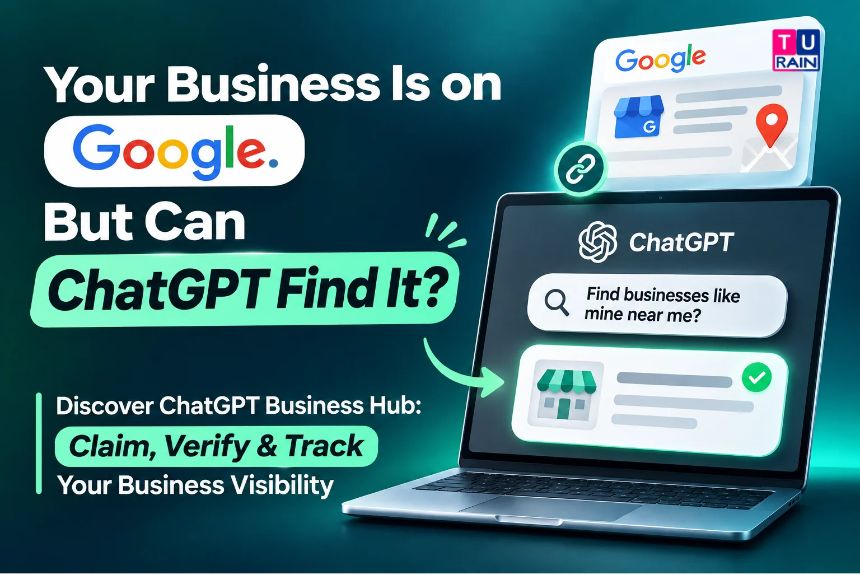
Getting found was considered a single task for twenty years, and it meant ranking on Google. That still matters, but it is no longer the whole story. On 10th November 2026, OpenAI opened a beta called Businesses in ChatGPT, which is a timely and useful tool for owners who want more visibility. Its dashboard, ChatGPT Business Hub, lets owners claim their business inside ChatGPT, fix the details people see, connect a product catalog, and check how often ChatGPT mentions them. OpenAI says about 1.2 billion people use ChatGPT every week, according to VentureBeat’s coverage, so even a small slice of them asking about local businesses is a channel worth understanding. Calling this “the new local SEO” is catchy and points in the right direction, yet it is a beta and not a Google replacement. OpenAI has said ChatGPT keeps making its own independent recommendations, and that claiming a profile guarantees no placement or sales. It should be treated as an extra door into a business, not the only one, and this guide explains how it works, how to claim it, and how to read the numbers.
Why Google SEO Alone Isn’t Enough Anymore
Google SEO is a valuable and effective method for visibility, but it is not enough alone anymore. People still search, yet more of them now ask a question in plain language and get one written answer instead of ten blue links. When ChatGPT names or links to a business in that answer, the profile is what people can open. If the details are wrong, outdated, or missing, the damage stays unseen until someone else reports it. That is the thinking behind AI Search Optimization (AIO), also called generative engine optimization, and its goal is to make sure AI answers have accurate, current information about a business. ChatGPT Business Hub is the first tool from OpenAI itself that gives businesses a direct say in that, which can enhance trust, accuracy, and confidence for owners.
What Businesses in ChatGPT Actually Covers
Businesses in ChatGPT is a two-part, practical system for owners and customers. Business Hub is where a profile is claimed, details are edited, products are added, and Insights are seen. Business Agents are branded chat assistants that answer customer questions inside ChatGPT. What can be used depends on location and business type, as per OpenAI’s help documentation and early hands-on testing. The launch picture is listed below.
| Feature | Who can use it at launch |
| Claim and edit a profile | Owners or authorized representatives of a business with a website, in countries where ChatGPT is available |
| Claim a local store or restaurant | Existing US listings only |
| Product feed | Shopify stores connect directly; the standard upload targets the US |
| Insights dashboard | Approved and identity-verified profiles |
| Business Agent | Eligible US ecommerce and online-service businesses, one agent per profile |
Claiming is free at launch, and OpenAI’s monetization chief reportedly left the door open to charging later.
Who Can Claim a Business
Claiming a business is a controlled and verified process for genuine owners. Ownership of the business or authorization to represent it is required, and that connection must be proven and approved. Eligibility depends on location, category, and verification checks, according to OpenAI. Claiming a profile and creating an agent have different requirements, so passing one does not automatically pass the other. Such checks keep the system safe, reliable, and trusted for all parties.
Verification Methods
Verification methods are a simple and flexible way for owners to prove their connection to a business. Business Hub only shows the options that apply to a listing. These options are quick to complete, and they help to build a secure and credible profile. Here is what is on offer.
| Method | How it works |
| Business phone | A code by text or call to the listed number |
| Business email | A code sent to the business address on file |
| Website domain | Add a DNS TXT record, then select Verify domain |
| Shopify | Connect your store |
How to Claim Your Business: Step by Step
The claim flow is a simple and clear process for owners, but the waiting is not. The steps are listed below.
- Sign in to ChatGPT and open Business Hub from the sidebar (chatgpt.com/business-hub)
- Search for your business by name.
- Select the matching listing and confirm the ChatGPT account that will manage it
- Accept OpenAI’s Businesses in ChatGPT Terms
- Choose a verification method and complete it.
- Wait for OpenAI’s review. The decision comes by email.
- Complete the Persona identity check once the claim is approved.
Early testers reported two paths for this flow. A business ChatGPT already listed was sent to a waitlist, since OpenAI is opening access gradually. A business it didn’t know yet could create and verify a profile right away. The experience may differ for each owner, and this will likely change as the beta rolls out.
OpenAI Domain Verification: Getting the DNS Record Right
Domain verification is a common and frequent hurdle for most owners. It is not hard, but DNS usually belongs to someone else. The process is helpful to understand early, as it can save time, effort, and confusion. Here is the process.
- Choose a website domain in the claim flow.
- Copy the TXT record ChatGPT shows. Testers reported the host looks like openai-business-profile.yourdomain.com, but exactly what the screen displays should always be used.
- Add it in the DNS provider’s settings, or ask whoever manages the domain to add it.
- Return to ChatGPT and select Verify domain.
A few practical notes come from early testing. Some DNS providers append the domain automatically, so typing the full hostname can create a doubled domain. What the provider expects should be checked. The record may also expire, so it should be added soon after it is received. One of the testers found the Add products button disabled until the domain was verified, so this step should not be skipped by sellers of products.
The Persona Identity Check
The Persona identity check is the step that most guides gloss over, and it should not be skipped. Once a claim is approved, identity verification with Persona must be completed before changes can be published, Insights can be viewed, or a Business Agent can be created. Early reports say it involves a government ID and may include business registration documents. Details like name and registration number should match official records. Deciding early who does this is a wise and helpful move, because the profile gets tied to one person’s identity, so he or she should be someone who will stay with the company. Teammates and agencies can reportedly be added afterwards with their own accounts.
Before Your Profile Goes Live
The review stage is a valuable and limited window for editing, and it should be treated as the only safe one. One early test reported that an approved profile goes live automatically, and that OpenAI Support can’t delete or unpublish it. Only drafts can be removed. That is a single hands-on report, so it should be confirmed in the owner’s own account, but preparing as if it is true costs nothing. Such care can protect a brand from errors and from stress later.
So before approval:
- Finalize the description, category, logo, cover photo, delivery policy, and return policy
- Claim each brand and location separately. Claiming a main brand doesn’t appear to claim its locations.
- Check the suggested category. One tester’s real estate agency was auto-suggested as a “Home goods store”
- Write the description as the answer that ChatGPT should give
If someone else has claimed a listing, testers found a dispute ownership option in the menu.
Feeding Your Product Catalog to ChatGPT
The product catalog is the practical and rewarding part of ChatGPT Business Hub for sellers. Shopify stores can connect directly, review their catalog data, and preview their agent. Everyone else prepares a CSV, JSONL, or hosted feed that follows OpenAI’s product feed specification. This task should be handed to whoever manages the catalog, as data quality matters more than speed. Early testers reported a spec of 48 fields, nine of them required.
| Required field | Rule |
| item_id | Stable and unique per item or variant |
| title | Up to 150 characters |
| description | Plain text, up to 5,000 characters |
| url | Product page |
| brand | Brand name |
| seller_name | Who sells it |
| image_url | Direct link to the main image |
| price | Amount, space, currency code (49.00 EUR) |
| availability | in_stock, out_of_stock, pre_order, backorder, or unknown |
This table should be treated as a starting checklist, and the current spec should be checked before a feed is built. A few rules reportedly catch teams out.
- Empty or misspelled availability values get rejected
- Sale and availability dates don’t schedule anything, so sale prices need manual updates.
- The standard feed upload targets the U.S
- A feed makes products available to ChatGPT. It doesn’t promise they’ll be recommended
Where Conversational AI Commerce Fits In
A Business Agent is OpenAI’s version of a branded sales assistant, and it is a useful and modern tool for online sellers. It answers customer questions about products and policies using the information and feed provided. It is available to eligible US e-commerce and online-service businesses, and it is free at launch. Set up is straightforward: after the claim and Persona check are finished, the information the agent will use is reviewed, answering instructions are written, a real question is used for preview, and then the agent is published. Only published agents reach customers.
Two limits matter. Checkout, bookings, and order lookups still happen on the business’s own website. Early guidance also says the agent must disclose that it’s an AI and can’t invent products, prices, stock, or reviews. OpenAI reviews each version and can pause or remove agents.
Reading Your AI Search Metrics
Insights is a detailed and helpful dashboard for tracking AI search activity. Once the claim and Persona check are approved, it can be opened from ChatGPT Business Hub. It shows aggregate activity over the past 28 days, and some reviewers saw a 7-day toggle too.
| Metric | What it counts |
| Mentions | For an online business, times ChatGPT referenced your website. For a local business, times your location appeared in a result |
| Website clicks | Recorded clicks on links to your site |
| Discovery topics | Common themes in answers that mentioned or cited your business |
These numbers should be read carefully, because they are narrower than they look.
- Clicks aren’t visits. OpenAI’s own dashboard note says clicks don’t confirm website visits or conversions.
- Mentions mean website references. An answer that names a brand without linking the site isn’t counted.
- Thresholds apply. Metrics appear only once enough conversations meet OpenAI’s minimums, so a blank doesn’t mean zero.
- No prompts or chats. OpenAI doesn’t share user conversations or Business Agent chats with businesses.
- 28 days only. There’s no long history, so a snapshot should be saved every month
A safer label for reports is “ChatGPT website references.” Calling it “AI visibility” overstates what it measures, which makes a metric-optimal and honest report harder to build.
What Insights Can’t Tell You
Insights is a focused and limited tool that covers ChatGPT alone. It doesn’t show competitors, other AI tools, or the exact questions people asked. Some gaps can be filled by owners without buying anything, which is a practical and cost-effective choice for small teams. The options are listed below.
- Check your own analytics for traffic arriving from ChatGPT, and tag links where you control them
- Run a fixed set of real customer questions in ChatGPT every month and record what it says about .you
- Keep your website, Google profile, and policies consistent, since AI answers draw on more than one source.
- Log your 28-day Insights numbers monthly to build your own history.
Dedicated AI visibility tools exist for broader tracking. They should be evaluated based on the needs of a business, since this category is new and moving quickly.
Want help claiming your profile, verifying your domain, or preparing a product feed? Talk to Turain’s team before you start, so your first submission is clean.
Frequently Asked Questions
Is claiming a business on ChatGPT completely free for Indian companies?
Yes, claiming your profile and accessing the Business Hub is free at launch. Businesses in any country where ChatGPT operates can claim their profile, update their details, and access aggregate Insights. However, OpenAI has indicated that future monetization layers could be added, and certain advanced features like Business Agents are currently limited to eligible US e-commerce and online-service businesses.
Will verifying our profile push us higher in ChatGPT’s local recommendations?
No. Unlike traditional Google SEO, where optimizing your Google Business Profile directly influences local map pack rankings, claiming your ChatGPT profile does not manipulate the AI's core recommendation engine. The primary benefit is accuracy: ensuring that when ChatGPT does recommend your business, the AI has your correct website, delivery policies, and product availability on hand.
What exactly does the 'Mentions' metric track in the Insights dashboard?
The 'Mentions' metric strictly tracks the number of times ChatGPT explicitly references or links to your registered website in a user's answer. If the AI mentions your brand name in passing without tying it to your claimed domain, it will not register in the dashboard. Similarly, 'Website clicks' tracks actual taps on those generated links, but does not guarantee a completed visit or sale on your actual site.
Can we see the exact questions users are asking about our brand?
No. To maintain strict user privacy, OpenAI does not provide businesses with raw chat transcripts, personal user data, or specific prompts. The Insights dashboard only displays aggregated 'Discovery topics'—broad themes or categories (like "smartphone comparisons" or "travel booking") where your business naturally surfaced during conversations.
Is ChatGPT Business Hub free?
Yes, at launch. Claiming a profile and publishing a Business Agent are free for now, and OpenAI hasn't ruled out charging later.
Does claiming my business improve my ChatGPT ranking?
Not by itself. OpenAI says claiming doesn't guarantee placement or sales, and ChatGPT keeps using other sources when it talks about a business. What claiming does is let owners correct their details and see how ChatGPT engages with their site.
Do I need a Shopify store?
No. Shopify merchants get a direct connection, but other retailers can upload a compatible feed.
Is the Business Agent available outside the US?
Not at launch. It is limited to eligible US e-commerce and online-service businesses.
Why am I on a waitlist?
OpenAI is opening access gradually. Early testers reported waitlists for businesses ChatGPT already listed, while unlisted businesses could create profiles right away.
Can I stop caring about Google SEO?
No. Business Hub is a new channel on top of existing search work, not a replacement for it.
Disclaimer
Businesses in ChatGPT is in beta, and features, eligibility, and pricing may change. This guide will be updated as OpenAI revises Business Hub. Always confirm current steps inside your own Business Hub account and in OpenAI's help center.
AI Platform & Beta Feature Notice: The “Businesses in ChatGPT” program, including the Business Hub and Business Agents, is currently in beta as of November 2026. OpenAI is rolling out features gradually, and eligibility for specific tools—such as the creation of Business Agents or local storefront claiming—may initially be restricted to US businesses before expanding globally. Claiming a business profile does not guarantee favorable recommendations, as ChatGPT’s underlying language models retain independent conversational reasoning. Furthermore, the Insights dashboard relies on strict privacy thresholds; OpenAI does not share individual user chat logs or raw prompt data with businesses. Always verify the latest product feed specifications and verification protocols directly through your OpenAI account, as beta requirements frequently change.
Official Reference Links
- OpenAI – Businesses in ChatGPT Official Portal: openai.com/business/businesses-in-chatgpt
- OpenAI Help Center – Managing Your Profile: help.openai.com