Every marketer knows this moment. A customer clicks your ad, gets redirected to a landing page, and then… vanishes.
The page didn’t load fast enough. Logging in felt like a hassle. Maybe they just got distracted by a notification. Whatever the reason, that lead is gone, and no amount of retargeting fully brings it back.
WhatsApp Flows exist to kill that exact moment. And after watching this feature mature since its October 2023 rollout, it’s worth asking seriously: are external landing pages actually becoming optional?
What a WhatsApp Flow Actually Is
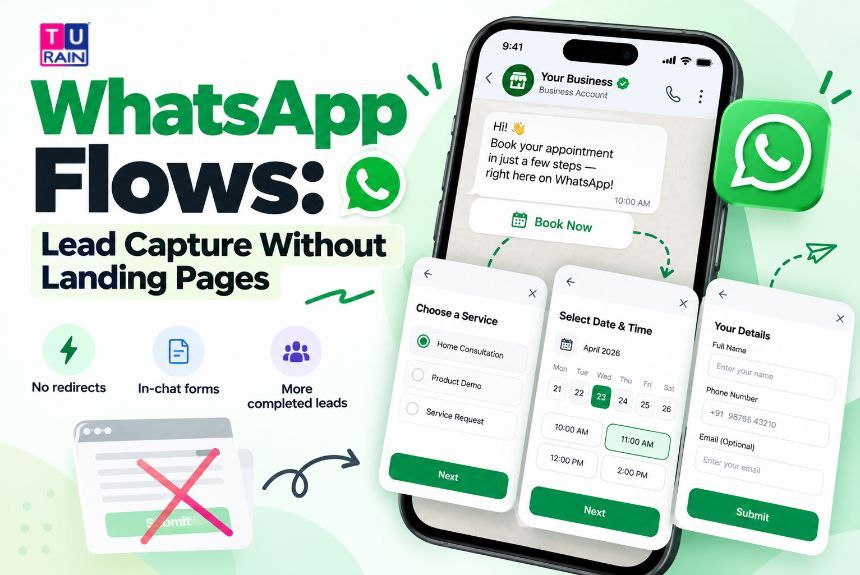
A Flow is a structured, multi-screen form that opens right inside a WhatsApp chat. No redirect. No new tab. No “please log in to continue” wall.
A customer taps a button on a message, and a clean form slides up from the bottom of their screen — native, fast, familiar. They fill it in using dropdowns, date pickers, checkboxes, text fields. They hit submit. Done. The whole thing happens without ever leaving the app they already check fifty times a day.
That’s the pitch, anyway. What’s actually under the hood is more interesting than the marketing copy suggests.
The Technical Skeleton: Flow JSON
Every Flow is built from a JSON document — Meta’s own format for defining screens, components, and the logic connecting them. This isn’t optional config. It’s the actual blueprint.
Each screen can hold components like TextHeading, TextBody, TextInput, Dropdown, RadioButtonsGroup, CheckboxGroup, DatePicker, and OptIn checkboxes. You assemble these into screens, define how one screen routes to the next using a routing model, and Meta validates the whole structure before it goes live. Get the JSON wrong, and you’ll see validation errors before anything reaches a real customer.
Flows also need a category at creation — Meta currently recognises Sign Up, Sign In, Appointment Booking, Lead Generation, Contact Us, Customer Support, Survey, Shopping, and Other. This isn’t cosmetic. The category determines which message templates the Flow can attach to, and how Meta reviews it before approval.
Static vs. Dynamic: Not All Flows Work the Same Way
Here’s a distinction most surface-level explainers skip over.
A static Flow has everything predefined. Screens, options, logic — all baked into the JSON upfront. No server call happens between screens. Good for simple things: feedback surveys, basic sign-ups, anything where the questions don’t depend on live data.
A dynamic Flow is a different animal. It connects to your own backend through an endpoint_uri, exchanging encrypted data between screens in real time. This is what powers something like appointment booking with actual live slot availability, or a product configurator that pulls real stock data. It’s more powerful, but it also means your dev team is handling encryption and a proper API contract — not a weekend project.
How to Create WhatsApp Flows for Business
Creating WhatsApp Flows for business involves more than adding a few form fields. Every Flow needs a clear purpose, a structured layout, and a reliable way to process customer information.
The process begins with choosing the right interaction — lead generation, appointment booking, customer registration, or feedback collection. From there, businesses can build the Flow using Meta’s WhatsApp Business Platform or a compatible solution provider.
Create Flows Using the WhatsApp Business Platform
WhatsApp Flows are built using JSON, which defines the screens, input fields, and navigation. A simple lead capture Flow might collect contact details, while a dynamic booking Flow connects to a backend system to retrieve available appointments.
Once configured, the Flow must pass Meta’s validation requirements before publication.
Use a WhatsApp Flow Builder
Not every business needs to write JSON manually. A WhatsApp Flow Builder offered by a compatible solution provider can simplify the process through visual tools.
Businesses can arrange dropdowns, text fields, and other supported components without building every screen from scratch. However, advanced integrations may still require technical expertise.
Connect WhatsApp Flows With Your CRM
Capturing a lead means little if nobody follows up.
Through WhatsApp CRM integration, businesses can connect submitted customer information with their existing systems, organise enquiries, and streamline follow-up processes.
The objective is straightforward: fewer unnecessary steps for customers and a more efficient lead management process for businesses.
Getting a Flow in Front of Customers
A Flow doesn’t just exist in isolation. It has to be attached to a message template with a Flow button, and that template needs Meta’s approval — typically within 24 to 48 hours. Once approved, the Flow launches when a customer taps the button, and submissions get sent back either into your CRM, your backend, or straight into whatever automation platform you’re running.
One detail that genuinely changes the economics here: service conversations on WhatsApp have been free since November 2024. If a customer initiates the chat — which they typically do when responding to an ad or a message you’ve sent — qualifying or routing them through a Flow during that window doesn’t cost you per-message fees. That’s a meaningful shift from the earlier pricing model, and it’s part of why Flows have become such a default recommendation in WhatsApp marketing circles lately.
WhatsApp Flows vs Landing Pages: Which Works Better?
Lead capture is the obvious one. Instead of “enter your email to download this,” a business can deliver the whitepaper directly inside the same conversation, after a short qualifying form.
Appointment booking is probably the strongest use case right now. A date picker, a time slot dropdown, a service selector — all native, no app-switching. Lenovo and several healthcare and automotive brands have leaned into this specifically because booking rates climb when friction drops.
Surveys, event registrations, loan or insurance intake forms, catalog orders — all of it maps cleanly onto the same structure. And because it’s inside WhatsApp, there’s no “is this link safe?” hesitation that external URLs often trigger, especially in markets where phishing-via-SMS has made people understandably cautious of clicking anything.
Industry reporting circulating through martech blogs has pointed to drop-off reductions in the 45–60% range compared to mobile web forms, alongside faster completion times. Worth treating those specific numbers as vendor-reported benchmarks rather than audited Meta statistics — real, but context-dependent, and likely to vary by industry and form complexity.
| Comparison Factor | WhatsApp Flows | Traditional Landing Pages |
|---|---|---|
| Customer Experience | Customers complete forms inside WhatsApp without switching apps. | Customers leave the conversation and open an external webpage. |
| Lead Generation | Ideal for quick enquiries, lead qualification, and short forms. | Better suited to detailed offers and longer lead capture journeys. |
| Appointment Booking | Supports in-chat booking forms and live availability through backend integration. | Supports booking systems with more complex features and interfaces. |
| Setup Requirements | Requires WhatsApp Business Platform access and Flow configuration. | Requires a website or landing page builder and form setup. |
| SEO Visibility | Flows aren’t standalone webpages that can rank in Google Search. | Search-optimised landing pages can attract organic traffic. |
| CRM Integration | Can send customer information to connected CRM or backend systems. | Can integrate with CRM platforms and marketing automation tools. |
| Content Flexibility | Best for short, structured interactions. | Better for detailed content, product comparisons, and complex journeys. |
| Conversion Potential | Reduces app-switching friction for customers already using WhatsApp. | Can convert effectively when the page matches user intent and provides a smooth experience. |
Where Flows Still Fall Short of a Full Website
This is the part the hype pieces tend to skip.
Flows are capped, practically speaking, at around three to five screens before completion rates start dropping — Meta’s own best-practice guidance says as much. A complex multi-step onboarding journey, a detailed product catalog with filtering, or a payment flow with multiple line items doesn’t fit comfortably inside that constraint.
Flows also require the WhatsApp Business Platform (the Cloud API), not the basic WhatsApp Business App most small shopkeepers use. Setting one up — writing valid Flow JSON, handling encryption for dynamic flows, getting templates approved — needs either developer resources or a no-code platform built specifically for it. Neither is instant.
And a landing page still does things Flows simply weren’t built for: long-form content, SEO visibility, browsing without committing to a conversation, or housing a full product catalog a customer might return to over days.
So, Is This the End of Landing Pages?
Not entirely. But for a specific, high-friction category of interaction — lead qualification, appointment booking, short intake forms, quick surveys — Flows are quietly becoming the better default.
The honest framing: Flows don’t replace your website. They replace the specific moment where a customer would otherwise be yanked out of a conversation and dumped onto a form they have a 50% chance of abandoning. For that moment, specifically, the external landing page is losing its job.
Ready to Simplify Your Customer Journey With WhatsApp?
External landing pages still have their place. But not every customer interaction needs another redirect. Connect with Turain to explore how WhatsApp Business API, interactive Flows and automation can support your lead generation and customer engagement strategy.
Talk to Our WhatsApp Solutions Team
Disclaimer
Platform Architecture & Data Privacy Notice: The technical capabilities, JSON schema requirements, and conversation-based pricing structures discussed in this guide reflect the WhatsApp Business Platform (Cloud API) environment as of late 2026. Meta frequently updates its API guidelines and endpoint encryption standards for dynamic Flows. Businesses connecting dynamic Flows to their proprietary backend systems are solely responsible for securing data transmission and maintaining compliance with data privacy regulations, including India’s Digital Personal Data Protection (DPDP) Act. All data collection fields within a Flow must clearly align with the user consent provided.
Frequently Asked Questions
Can I process a payment directly inside a WhatsApp Flow?
A Flow itself is a data-collection and routing interface, not a payment gateway. However, you can seamlessly chain the two together. Once a user submits a Flow (for example, selecting seats for an event), your dynamic backend can instantly process that choice and push a native WhatsApp Payment request (via UPI, credit card, etc.) into the chat as the immediate next step in the conversation.
Do I absolutely need a developer to build the JSON for a WhatsApp Flow?
If you are connecting directly to Meta’s raw Cloud API, yes, you will need a developer to write the Flow JSON and configure the endpoint URIs for dynamic data exchange. However, if you are using an authorized Business Solution Provider (BSP) or a specialized marketing automation platform, many now offer visual, drag-and-drop Flow builders that generate the required JSON code in the background automatically.
Can an Instagram or Facebook Ad trigger a WhatsApp Flow directly?
Yes, and this is where Flows become incredibly powerful for lead generation. You can run Click-to-WhatsApp (CTWA) ads on Meta platforms. When a user clicks the ad, it opens a WhatsApp chat with your business and immediately triggers a pre-approved message template containing the Flow button. This bypasses the traditional website landing page entirely.
What happens if a customer’s WhatsApp app is outdated and cannot load the Flow?
Meta has built-in graceful degradation for this exact scenario. If a user receives a Flow button but their version of WhatsApp is too old to render the native UI components, WhatsApp will automatically generate a secure fallback link. When tapped, this link opens the exact same form in their mobile web browser, ensuring you don't lose the lead due to app versioning issues.
Do I need the WhatsApp Business API to use Flows?
Yes. Flows run exclusively on the WhatsApp Business Platform (Cloud API), not the free WhatsApp Business App most small businesses start with.
Are WhatsApp Flows free to use?
The Flow feature itself carries no separate fee. Since November 2024, service conversations — the kind initiated by the customer — are free, which covers most lead-capture and booking scenarios.
How long does Flow approval take?
Templates with an attached Flow button typically go through Meta review within 24 to 48 hours.
Can a Flow replace my entire website?
No. It's built for short, structured interactions — forms, bookings, surveys. Long-form content, full catalogs, and complex multi-step journeys still belong on a proper website.
Official Reference Links
- Meta for Developers – WhatsApp Flows Documentation & JSON Schema: developers.facebook.com/docs/whatsapp/flows
- WhatsApp Business – Guide to Click-to-WhatsApp Ads: business.whatsapp.com/products/click-to-whatsapp-ads
- Meta for Developers – Conversation-Based Pricing Updates: developers.facebook.com/docs/whatsapp/pricing