Puja season does strange things to a support inbox.
One week, everything’s calm. The next, your phone won’t stop buzzing, your support team is drowning in the same three questions, and somewhere in the middle of it, a customer’s parcel is sitting two streets away — except nobody told them that.
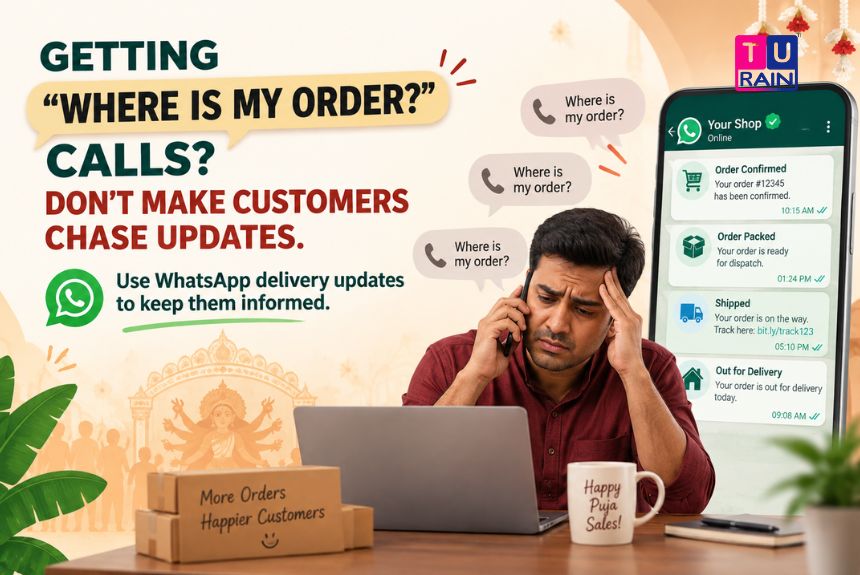
“Where is my order?” That one question, asked a hundred different ways, eats up more support time during festive weeks than almost anything else. WhatsApp delivery updates can reduce those repetitive enquiries by automatically keeping customers informed from order confirmation to final delivery.
The Problem Isn’t Late Deliveries. It’s Silence.
Here’s something worth sitting with: a delayed order rarely upsets a customer as much as an unexplained one does.
Give someone a clear timeline, and a two-day delay barely registers. Give them nothing, and even an on-time delivery starts to feel shaky. Silence is the actual product defect here, not the courier.
Industry data backs this up pretty consistently. “Where is my order” queries — commonly shortened to WISMO — typically make up somewhere between 30% and 50% of all ecommerce support ticket volume, and that share climbs sharply during peak shopping periods like Puja and Diwali. One well-known reason: nearly a fifth of shoppers say they simply won’t order again from a brand that fails to keep them updated on tracking. Repeat business, quietly, dies in that silence.
Why WhatsApp Fixes This Better Than Email or SMS Ever Did
Email confirmations get sent. They also get ignored — average open rates for order-related emails hover around 20 to 25%, and a good chunk lands straight in spam or promotions folders. SMS does slightly better but offers no context, no images, no reply option, nothing beyond a flat line of text.
WhatsApp behaves differently.
Messages sent through WhatsApp for order updates see open rates in the 90–98% range, and most of them get read within minutes, not hours. That’s not a small gap. That’s the difference between a customer who feels informed and one who’s already dialling your support number out of pure anxiety.
The reason isn’t really technical. It’s behavioural. WhatsApp is where people already are — chatting with family, coordinating Puja plans, forwarding pandal-hopping schedules to their group. An order update landing in that same space feels less like a notification and more like a message from someone who’s actually paying attention.
What Automated WhatsApp Updates Actually Look Like
This isn’t about a person manually typing “your order has shipped” to every customer. That doesn’t scale, and during festive volume spikes, it collapses almost immediately. Automation is what makes this work.
A well-built WhatsApp order journey typically fires at four key moments:
- Order Confirmed — sent the instant a purchase goes through, with order number, items, total, and expected delivery window
- Order Packed — a short update confirming the order is ready to move, often with the courier name attached
- Dispatched / Shipped — includes a tracking link and a live estimated arrival window
- Out for Delivery / Delivered — the final nudge, timed for the day the parcel actually reaches the customer’s doorstep
Each of these falls under what Meta classifies as a utility message on the WhatsApp Business Platform — transactional updates tied directly to something the customer did, like placing an order. That distinction matters operationally, because utility messages are treated differently from promotional ones, and businesses running Puja campaigns need to know which bucket their messages fall into before they hit send.
The Numbers That Actually Matter to a Business Owner
Enough about open rates. Here’s what this translates to on the ground.
Businesses that automate WhatsApp order confirmations and shipping updates report support ticket reductions in the range of 30% to 40% specifically for order-status queries. Some case studies push that number higher, closer to 50%, particularly when branded tracking links are paired with proactive delay alerts rather than customers having to chase the information themselves.
There’s an upsell angle too, though it’s secondary. A well-timed WhatsApp confirmation, with a small “thank you” note or a soft cross-sell nudge, tends to see click-through rates several times higher than the equivalent line in an email footer — largely because people are actually opening the message in the first place.
None of this requires a customer to download anything. No app, no login, no “create an account to track your order” wall. Just a message, in the same thread where they probably just texted a cousin about pandal timings.
A Realistic Example: A Kolkata Clothing Brand During Puja Week
Picture a mid-sized ethnic wear brand shipping across West Bengal in the ten days before Panchami.
Order volume triples. Delivery partners get stretched thin. Under the old setup — a confirmation email and a courier SMS — the support team fields the same question on loop: “Bhaiya, order kobe ashbe?” Multiply that by a few hundred customers a day, and the team spends more time repeating tracking numbers than actually solving problems.
Switch to automated WhatsApp updates, and the pattern changes. The customer gets a confirmation the moment they pay. A packed notification follows within a day. A shipped message arrives with a live tracking link the moment the courier picks it up. If there’s a genuine delay — Puja traffic being what it is — a proactive message goes out before the customer even thinks to ask.
The support team isn’t fielding “where is it” anymore. They’re handling actual problems: a wrong size, a damaged package, a genuine complaint. The noise clears out, and what’s left is work that actually needs a human.
Building Trust Beyond the Delivery Window
There’s a quieter benefit here that doesn’t show up in a ticket-reduction spreadsheet.
A customer who receives clear, timely updates — without asking — starts associating a brand with reliability. That association carries past the festive rush. It’s part of why repeat customers, who typically make up a modest share of total buyers, tend to drive a disproportionately large share of overall revenue. Trust, once built during a stressful shopping season, tends to stick.
Puja is loud, chaotic, and time-pressured for everyone — customers included. A business that manages to stay quiet, predictable, and informative in the middle of that chaos ends up standing out for exactly the right reasons.
Get Your WhatsApp Delivery Updates Ready Before the Puja Rush
From automated order confirmations to shipment notifications and tracking updates, build a WhatsApp communication workflow designed to keep customers informed throughout their order journey.
Get Started With Turain‘s WhatsApp Business Solutions
Talk to our team about setting up automated WhatsApp order confirmations and delivery tracking before Mahalaya.
Disclaimer
Platform & Integration Notice: This guide is for informational purposes and reflects the capabilities and categorization models of the WhatsApp Business Platform (API) as of mid-2026. Meta frequently updates its conversation-based pricing tiers, Utility template guidelines, and Business Messaging Policy. Additionally, automating live delivery updates requires active API integration between your e-commerce backend (e.g., Shopify, WooCommerce), your logistics/courier partner, and your WhatsApp Business Solution Provider (BSP). Businesses must ensure their data-sharing practices comply with applicable data protection laws, including India's Digital Personal Data Protection (DPDP) framework, when passing customer phone numbers and addresses between these systems.
Frequently Asked Questions
Do WhatsApp order updates cost the same as promotional WhatsApp messages?
No. Order confirmations and shipping updates fall under Meta's utility message category, which is billed differently from marketing messages. Utility messages sent in response to a customer action, such as a purchase, are generally cheaper, and some are free when sent within an existing customer service window.
Can WhatsApp delivery updates reduce customer support calls?
Proactive WhatsApp delivery updates can reduce repetitive order-status enquiries because customers receive information before they need to ask “Where is my order?” The article specifically focuses on using automated confirmations, tracking links and delay notifications to reduce this support burden.
Does this require the customer to save the business number?
No. As long as the customer has opted in — typically by placing the order — the business can send transactional updates without the customer needing to save the number first.
Can small businesses use this, or is it only for large ecommerce brands?
Any business running a WhatsApp Business API setup or a business tool built on top of it can automate this. Order volume during Puja season is exactly the scenario where smaller teams benefit the most, since manual updates become impossible to sustain past a certain volume.
What's the single highest-impact update to automate first?
The shipped/dispatched message with a live tracking link. It addresses the most common WISMO trigger directly and requires the least setup effort to start.
How does WhatsApp actually know when my courier dispatches a package?
WhatsApp itself does not track packages. The automation happens through an API integration. When your courier partner (e.g., Blue Dart, Delhivery) updates the tracking status in their system, they trigger a "webhook" to your e-commerce platform or CRM. Your system then instantly tells the WhatsApp Business API to fire the corresponding Utility template to the customer.
Do I need to ask for customer consent just to send an order receipt?
Yes. Even for transactional updates (Utility messages) like order confirmations or shipping alerts, Meta’s Business Messaging Policy requires a clear, active opt-in from the customer. For e-commerce, this is usually handled by adding an unchecked box at the checkout page that says, "Send my order updates and tracking via WhatsApp."
Are Utility messages priced differently than Marketing messages?
Yes. Meta uses a conversation-based pricing model, and Utility conversations (order updates, account alerts) are billed at a significantly lower per-message rate than Marketing conversations (promotions, festive offers). Furthermore, any customer replies to your Utility message within a 24-hour window do not incur additional template charges.
Can a customer track their live delivery location inside WhatsApp?
While you cannot natively embed a live-moving GPS map directly inside a standard WhatsApp chat bubble, your "Shipped" or "Out for Delivery" template can include a Call-to-Action (CTA) button. When the customer taps this button, it seamlessly opens the courier's live tracking URL in their device's browser.
Official Reference Links
- WhatsApp Business Platform – Conversation-Based Pricing: business.whatsapp.com/products/pricing
- WhatsApp API Documentation – Utility Templates: developers.facebook.com/docs/whatsapp/message-templates/guidelines
- Meta Business Help Center – Opt-In Requirements: business.whatsapp.com/policy