For eleven years, WhatsApp didn’t run ads. Not one. Then, in June 2025, that changed — Meta introduced full-screen ads inside the Status tab, and the platform hasn’t stood still since.
By February 2026, WhatsApp confirmed a global rollout of Status ads and Promoted Channels, meaning this isn’t a regional experiment anymore. It’s live infrastructure, sitting inside an app with 1.5 billion daily users passing through the Updates tab. And now Meta is reportedly extending carousel formats — the same swipeable, multi-card structure that’s driven strong results on Facebook and Instagram — into this placement, with optimization built around sales, leads, and engagement.
If you’ve been running click-to-WhatsApp ads on Facebook or Instagram already, this isn’t a foreign concept. It’s the same mechanics, placed somewhere your audience is paying closer attention.
What WhatsApp Status Ads Actually Are
Status ads show up between the Status updates posted by a user’s own contacts — the same full-screen, vertical, swipe-through format WhatsApp users already scroll through daily. They’re clearly labelled “Sponsored,” they sit only inside the Updates tab, and they’re kept separate from private chats, groups, and calls. WhatsApp has been explicit about that last point, likely because trust in a private messaging app is fragile, and nobody wants ads bleeding into personal conversations.
Tap one, and you don’t land on a website. You land in a WhatsApp conversation with the business, usually with a pre-filled message or a set of suggested prompts waiting for you.
That single difference — chat instead of landing page — is what makes this format worth paying attention to for direct response marketers.
Where Carousel Fits In
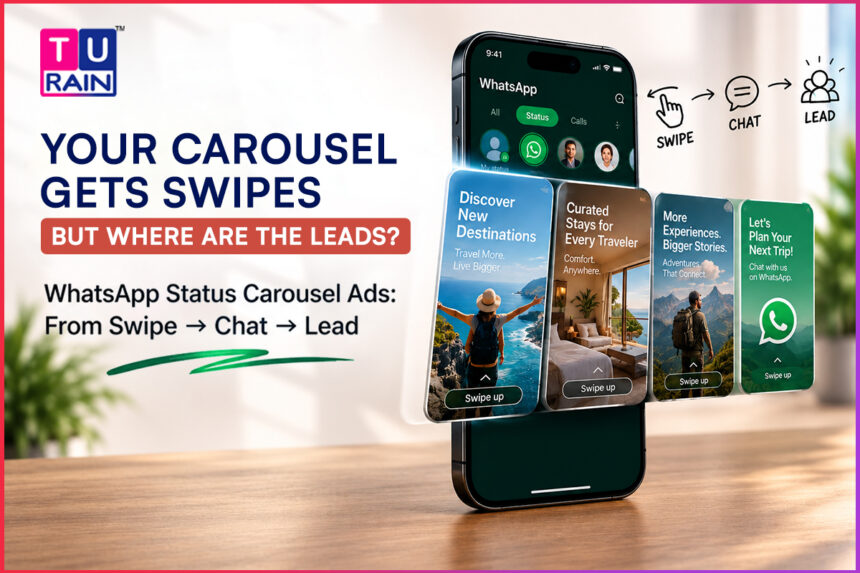
Standard Meta carousel ads run 2 to 10 cards, each carrying its own image or video, headline, link, and call-to-action. That structure already exists across Facebook and Instagram Feed, and Meta’s developer documentation confirms that click-to-WhatsApp ad creative — the broader family Status ads belong to — supports image, video, carousel, and slideshow formats, alongside optional call prompts.
Carousel extending into the Status placement specifically is still rolling out, and availability may vary by region and account. But the direction is clear enough: instead of a single full-screen image or video, advertisers will be able to build a multi-card sequence a user can swipe through before ever leaving the ad unit — landing in a chat only once they’ve seen what they’re interested in.
For context, WhatsApp’s own Business Platform already supports a near-identical concept for existing customers — carousel template messages sent inside conversations, capped at 10 cards, each with its own media, short body text, and up to two buttons. Advertisers already comfortable with that structure won’t find much of a learning curve here.
Designing a Carousel That Moves People from Discovery to Enquiry
A carousel that just shows pretty pictures wastes the format. The point is to walk someone from “what is this” to “let me ask about it,” in as few swipes as possible. A few things matter more than others.
Card one carries the weight. Most people never make it past the first three cards, especially on a cold or lukewarm audience. Whatever your strongest offer, sharpest image, or clearest hook is — that belongs on card one, not buried on card six hoping someone gets there.
Every card should stand alone. People don’t always swipe in order, and some won’t swipe past card two at all. If a card only makes sense in the context of the one before it, you’ve built a slideshow, not a carousel.
Match card count to what you’re actually offering. Five well-made cards will usually outperform nine padded ones. The exception is a genuine multi-offer moment — a sale event with several distinct categories, a course catalogue, a set of products with different price points — where each card earns its place because it’s independently compelling.
Write for a thumb, not a paragraph. Character limits on carousel body text are tight by design. Lead with outcome, urgency, or a specific benefit, not a product description that reads like a spec sheet.
Make the CTA a natural next question. “Buy Now” works when someone’s ready. “Ask us which size fits” or “Get today’s price” works better when the product needs a conversation — which, on a chat-native platform like WhatsApp, is most of the time.
Setting Up the Campaign in Ads Manager
The underlying mechanics follow the same click-to-WhatsApp structure Meta has used since introducing Engagement, Leads, and Sales objectives for WhatsApp destinations.
- Confirm your WhatsApp Business number is connected to your Facebook Page or business portfolio — Ads Manager will walk you through it if it isn’t
- Pick your objective: Engagement if you’re optimizing for conversation volume, Leads if you want Meta to prioritize inquiry quality over raw volume, or Sales if you have purchase or conversion tracking set up and want higher-intent traffic
- Set the conversion location to messaging destinations, and select WhatsApp specifically — unchecking Messenger and Instagram if you want every lead consolidated in one inbox
- Build your carousel creative — one card per product, feature, or offer, each with its own headline and image or video
- Write the opening message and two to four tap-ready prompts that open the conversation naturally, rather than dropping the user into a blank chat window
- Staff your inbox before publishing. A lead that lands at 2 AM and gets a first reply fourteen hours later has usually already moved on
That last point isn’t a minor detail. Once a user messages your business, WhatsApp opens a 24-hour window for free-form replies. After that, you’re limited to pre-approved template messages. A slow first response doesn’t just lose momentum — it can push the conversation past the point where a natural reply is even possible.
Measuring What Matters
Resist the urge to judge these campaigns purely on click volume. A high number of chat opens with a low reply rate tells you the creative is working and the inbox isn’t. Track conversation starts, response time, qualified leads, and — where you have the tracking in place — purchases attributed back to the conversation, using Meta Pixel, Conversions API, or offline conversion imports.
Don’t switch to purchase-optimized bidding before you have enough volume for Meta’s algorithm to learn from. Thin data and aggressive optimization goals rarely mix well, on this format or any other.
Building a carousel campaign for WhatsApp Status and not sure where to start? Our team can help design cards that move users from a swipe to a real conversation — get in touch to talk through your first campaign.
Disclaimer
Advertising & Platform Disclaimer: This guide is for informational purposes only and reflects Meta’s advertising capabilities and WhatsApp Business Platform features as of mid-2026. Meta frequently updates its ad placements, algorithm optimization rules, and platform policies. The availability of specific ad formats, including multi-card carousels within the Status placement, may vary by region, account history, and rollout phases. Always consult the official Meta Business Help Center and review your local advertising regulations before allocating ad spend.[Text Wrapping Break][Text Wrapping Break]This guide reflects WhatsApp Status ad capabilities as they're rolling out through 2026. Carousel availability within the Status placement may vary by region and account — check Meta Ads Manager for what's live on your account.
Frequently Asked Questions
Can businesses run ads on WhatsApp Status?
Yes. Status ads launched in June 2025 and reached global availability by February 2026. They appear between user Status updates in the Updates tab, clearly labelled as sponsored content, separate from private chats and calls.
How many cards can a WhatsApp Status carousel contain?
Standard Meta carousel format supports 2 to 10 cards. As the carousel extends into the Status placement, that same range is expected to apply, consistent with carousel formats already available elsewhere in Meta's ad ecosystem and within WhatsApp's own message carousel templates.
Do WhatsApp Status ads open a chat?
Yes. Tapping a Status ad takes the user directly into a WhatsApp conversation with the business, typically with a pre-filled message or a set of suggested prompts, rather than an external website or landing page.
What campaign objectives work with WhatsApp Status ads?
Awareness, Traffic, Engagement, Leads, and Sales are all available, depending on whether you're prioritizing reach, conversation volume, inquiry quality, or purchase intent.
How does billing work for WhatsApp Status Ads?
You are billed through your Meta Ads Manager for the ad delivery itself (usually by impressions or clicks, depending on your optimization goal). However, once the user clicks through and sends a message, standard WhatsApp Business Platform conversation pricing may apply to the resulting chat session, depending on your API setup and who initiates the first billable template.
Can I retarget users who click on a WhatsApp Status Ad?
Yes. Through Meta Ads Manager, you can create Custom Audiences consisting of people who have sent a message to your connected WhatsApp Business account. This allows you to build highly qualified retargeting pools for future Facebook, Instagram, or Status ad campaigns.
Do I need the WhatsApp Business API to run Status Ads?
You do not strictly need the API (the free WhatsApp Business App can connect to a Facebook Page to run basic click-to-WhatsApp ads). However, to effectively handle the lead volume a successful carousel campaign generates—and to utilize automated welcome messages, chatbots, and CRM integrations—upgrading to the WhatsApp Business Platform (API) is highly recommended.
Can I use video in a WhatsApp Status Carousel Ad?
Yes. Meta’s standard carousel format supports a mix of static images and short videos across its cards. Using a short, high-movement video on the first card of your Status ad is a highly effective way to stop the user from swiping past your campaign.
Official Reference Links
- Meta Business Help Center – About Ads that Click to WhatsApp: facebook.com/business/help
- Meta Ads Guide – Carousel Ad Specifications: facebook.com/business/ads-guide/carousel
- WhatsApp Business Platform Documentation: business.whatsapp.com/developers/developer-hub
- Meta Conversions API (for tracking offline/chat purchases): developers.facebook.com/docs/marketing-api/conversions-api