
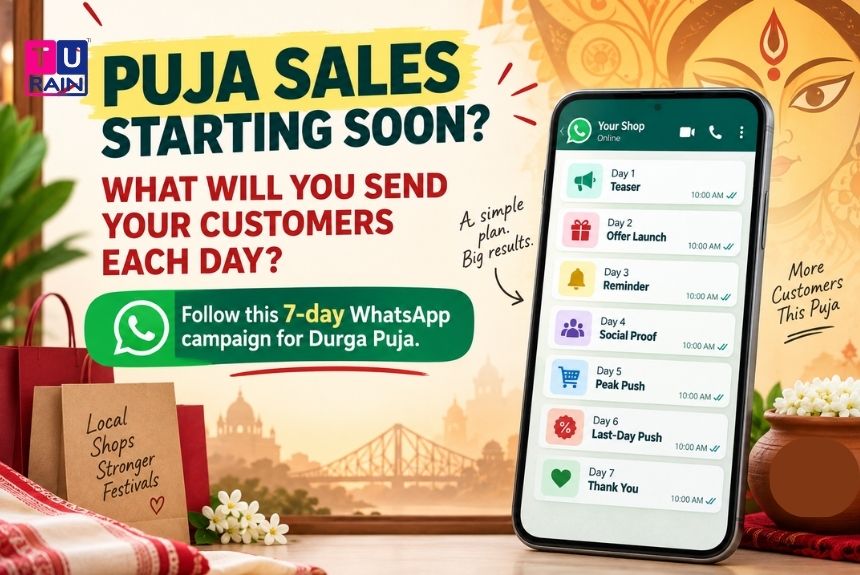
Puja shopping happens in a rush. New clothes, gifts, sweets, festive decor — most of it gets decided in the last two weeks before Shashthi, not months in advance.
That rush is exactly why WhatsApp works so well for local shops during this season. A well-planned WhatsApp campaign for Durga Puja can help shops stay visible, promote festive offers, remind customers at the right time and turn existing customer contacts into actual store visits and sales.
This guide lays out a simple 7-day plan. No fancy tools needed — just a phone, a broadcast list, and a bit of planning.
How to Prepare a WhatsApp Campaign for Durga Puja
Most local shops run WhatsApp through the free WhatsApp Business app, not the paid Business API. That matters, because the free app comes with real limits worth knowing upfront:
- Broadcast lists cap out at 256 contacts per list. Bigger customer base? Make multiple lists.
- Your message only reaches someone if they’ve saved your number in their contacts. No saved number, no delivery — WhatsApp’s built-in spam check.
- There’s no native scheduling. You’ll be sending each message manually, on the day, at the time you choose.
None of this is a dealbreaker. It just means the plan below is built to work within those limits, not around expensive tools you don’t need.
The 7-Day Calendar (Built Around 2026 Puja Dates)
Durga Puja 2026 runs from Panchami on 16th October to Vijaya Dashami on 21st October. Here’s how a 7-day campaign maps onto that week:
| Day | Date (2026) | Puja Day | Message Type | Goal |
| 1 | Thu, 15 Oct | Chaturthi | Teaser | Build curiosity |
| 2 | Fri, 16 Oct | Panchami | Offer Launch | Announce the deal |
| 3 | Sat, 17 Oct | Shashthi | Reminder | Keep it visible |
| 4 | Sun, 18 Oct | Saptami | Reminder + Social Proof | Build trust |
| 5 | Mon, 19 Oct | Ashtami | Peak Push | Ride the biggest shopping day |
| 6 | Tue, 20 Oct | Navami | Last-Day Push | Create urgency |
| 7 | Wed, 21 Oct | Dashami | Thank-You | Close the loop, retain customers |
Ashtami is worth flagging separately. It’s traditionally the biggest single day for footfall and spending across most Puja markets, so Day 5 isn’t just another reminder — it’s where the campaign should peak.
Day-by-Day Breakdown
Day 1 — Teaser (Chaturthi): Don’t reveal the offer yet. Just plant the idea that something’s coming. A short line, a festive photo of your shop or products, maybe a one-word hook like “Something special this Puja…” works better than a full pitch. Curiosity gets people to actually read Day 2’s message instead of scrolling past it.
Day 2 — Offer Launch (Panchami): This is the message that does the heavy lifting. State the offer clearly — discount percentage, minimum purchase, validity dates. Keep it short enough to read in five seconds. Add a photo. If you’re using WhatsApp’s Catalog feature, this is the day to link it, so customers can browse without stepping into the shop first.
Day 3 — Reminder (Shashthi): Shashthi marks the start of actual pandal-hopping and public celebration. People are out, in a spending mood, and your Day 2 message may already be buried under dozens of others. A short nudge — “Offer’s live, 2 days of shopping ahead” — keeps you visible without repeating the whole pitch.
Day 4 — Reminder + Social Proof (Saptami): By now, some customers have already bought. Use that. A quick photo of happy customers, a stock update (“New Ashtami collection just in”), or a simple line about what’s selling fast builds trust faster than another plain discount reminder.
Day 5 — Peak Push (Ashtami): This is your biggest day. Lead with urgency, but keep it honest — no fake countdowns. “Ashtami special, today only” works if it’s actually true. Consider a small Ashtami-specific add-on: a modest extra discount or a free small item with purchase, just for this one day.
Day 6 — Last-Day Push (Navami): Navami is typically the last big shopping and eating-out day before Dashami closures and immersion processions take over. Frame this message around finality — “Last day for the Puja offer” — because it genuinely is. This is where urgency converts fence-sitters who’ve been meaning to buy all week.
Day 7 — Thank-You (Dashami): Skip the sales pitch entirely today. Dashami is emotional — it’s farewell to the goddess, not a shopping day for most people. A warm “Subho Bijoya” message, thanking customers for their support this Puja, does more for long-term loyalty than one more discount ever could. This is also a good moment to mention you’ll be open for post-Puja needs, without pushing anything.
A Few Things That Make This Work Better
Get the opt-in right, early. Before this week even starts, make sure your customer list is people who’ve actually saved your number and agreed to receive updates. A broadcast to unwilling contacts gets ignored, or worse, reported.
Keep photos real, not stock images. A phone photo of your actual shop decorated for Puja, or your actual product on a shelf, performs better than anything polished. Customers trust what looks familiar.
Don’t send more than once a day. Even during the peak days, one well-timed message beats three scattered ones. WhatsApp fatigue is real, and it’s the fastest way to get muted.
Time your sends around the day’s rhythm. Morning messages (around 10–11 AM) work for planning-stage decisions. Evening messages (around 6–7 PM) work better for last-minute, come-shop-now pushes — especially on Ashtami and Navami, when evening footfall peaks.
Want to Run a WhatsApp Campaign for Your Shop This Puja?
Turn your festive offers into a structured WhatsApp campaign with the right messages, timing and customer communication strategy.
Explore Turain‘s WhatsApp Business Solutions.
Get in touch with our team for a customised WhatsApp campaign kit for your shop this Puja.
Disclaimer
Marketing & Platform Policy Disclaimer: This guide provides strategic recommendations for informational purposes only. The features and contact limitations (such as the 256-contact cap per broadcast list) reflect the capabilities of the free WhatsApp Business App as of mid-2026. Meta continuously updates its anti-spam algorithms and Business Messaging Policies. Businesses must ensure that all recipients have mutually saved their contact numbers and provided clear consent to receive promotional messages; failing to do so risks temporary or permanent account suspension. Durga Puja dates referenced are based on the 2026 calendar and may be subject to minor regional variations based on local panchang calculations.
Frequently Asked Questions
Do I need the WhatsApp Business API for this?
No. The free WhatsApp Business app handles this entire 7-day plan comfortably, as long as your customer list fits within the 256-contact broadcast limit. Multiple lists solve that if you've got more contacts than that.
What if a customer hasn't saved my number?
They won't receive your broadcast. This is a WhatsApp anti-spam rule, not a bug. Worth running a quick "save our number for Puja updates" push a week or two before this calendar starts.
Should Day 7's message include another discount?
Better not to. Dashami thank-you messages work because they don't ask for anything. Save the next offer for a separate, later message — closer to Bhai Phonta or the post-Puja shopping lull, if that's relevant to your business.
Can I reuse this exact calendar every year?
The message types and sequencing hold up year to year. The dates won't — Durga Puja shifts on the Gregorian calendar based on the lunar calendar, so recheck the year's Panchami-to-Dashami dates before reusing this plan.
How do I prevent my WhatsApp Business number from getting banned during the Puja rush?
To avoid triggering WhatsApp’s spam filters, never buy third-party contact lists or blast messages to strangers. Ensure your customers actively consent to updates and save your number at the billing counter. If you have multiple broadcast lists, space out your sends by a few hours rather than blasting hundreds of messages at the exact same minute, and immediately remove anyone who asks you to stop messaging them.
Can I include a link to my WhatsApp Catalog in these daily broadcasts?
Yes, and you absolutely should. Attaching a direct link to your in-app WhatsApp Catalog in your Day 2 (Offer Launch) and Day 5 (Peak Push) messages is highly effective. It allows your customers to browse your festive inventory and build a cart seamlessly without ever leaving the chat screen.
How do I track if my broadcast messages are actually being read?
In the free WhatsApp Business app, you can long-press the specific broadcast message you sent and tap the "Info" (i) icon. This screen will show you exactly how many people successfully received and read your message. If your "Delivered" count is significantly lower than the number of people on your list, it confirms those missing customers have not saved your shop's number in their phones.
How can local shops use WhatsApp marketing during Durga Puja?
Local shops can use WhatsApp to announce festive offers, showcase products, share Catalog links, send timely reminders and communicate with existing customers. A structured campaign helps businesses avoid sending random promotional messages and instead communicate according to the customer's festive shopping journey.
Official Reference Links
- WhatsApp Help Center – How to use Broadcast Lists: faq.whatsapp.com/broadcast-lists
- Meta Business Help Center – Create and manage a catalog: facebook.com/business/help/catalog
- WhatsApp Commerce Policy: business.whatsapp.com/commerce-policy