For years, SEO teams have run two completely separate operations.
One team watches the website. Rankings, clicks, impressions, all sitting neatly inside Search Console. The other team watches social — Instagram engagement, YouTube views, whatever X still calls its analytics dashboard this month. Neither team ever really saw the other’s data next to their own, let alone inside Google’s own reporting tools.
That changed in July 2026.
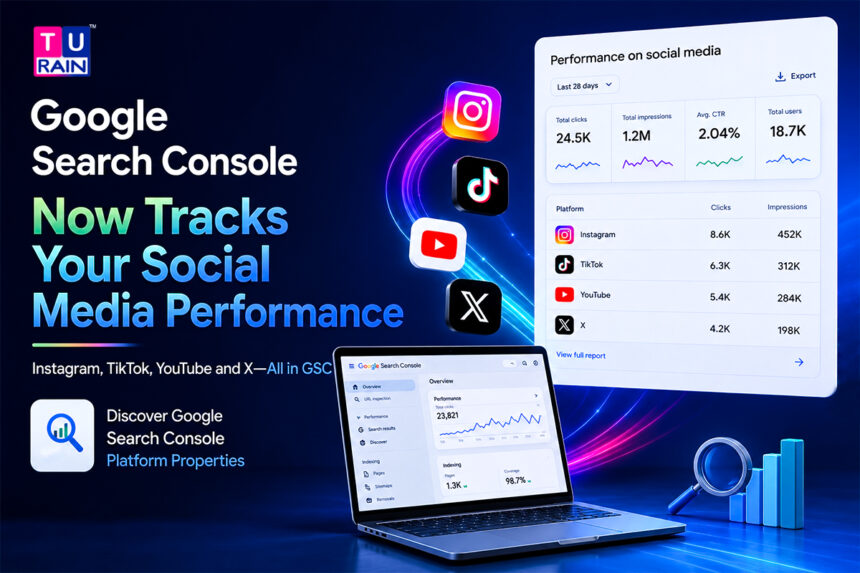
Google Search Console platform properties allow brands and creators to measure how content from supported social platforms performs across Google Search and Discover. The reporting can show search impressions, clicks, CTR, queries and individual content performance without requiring a verified website property.
Here’s what it actually does, how to set it up, and why it matters more than another shiny new report tab.
What Platform Properties Actually Are
A quick bit of context first, because the announcement itself was a little understated.
Google had experimented with something similar before — a feature called Social channels in Search Console Insights, introduced back in December 2025. Platform properties is the fuller, more permanent version of that idea. Google’s own Search Central blog described it as a new property type built to help site owners and creators understand how their social and video posts perform on Search and Discover, sitting right alongside the domain and URL properties that have existed in Search Console for years.
The difference between those old property types and this new one matters. Domain and URL properties require you to prove ownership of a website. Platform properties don’t. You’re not verifying a domain. You’re authorizing a social account — Instagram, YouTube, or X — directly, through an on-screen verification flow, no code and no file uploads involved. That single design choice opens the door to a group Search Console never really served before: creators and brands whose entire presence lives on a social platform, with no website to verify in the first place.
What You Can Actually See Once It’s Connected
Once a platform property is verified, three reporting areas become available.
The Performance report works much like the website version you already know. Total clicks, impressions, click-through rate — filterable and sortable down to individual posts and search queries. If a specific Reel or video is quietly pulling traffic from a query you didn’t expect, this is where you’d catch it.
The Insights report takes a faster, more digestible pass at the same data. Top-performing posts, audience interaction trends, and how your traffic has moved over recent months — less granular, more useful for a quick weekly check-in than a deep audit.
An Achievements section rounds things out, tracking milestones over rolling periods. It’s the least essential of the three for serious analysis, but useful for a quick pulse check without opening a spreadsheet.
Eligible accounts may also get separate reporting broken out for Discover and Google News, on top of standard Search data — though this appears to still be expanding account by account rather than available uniformly on day one.
One limitation is worth being upfront about. Platform properties only show how content performs on Google Search. They will not tell you how many times a video was viewed natively on YouTube, or how a post performed inside the Instagram app. If someone sees your Instagram Story appear in a Google search result, that counts as an impression, and a click on it counts as a click. What happens once someone is already inside the platform itself stays invisible to Search Console — that’s still the platform’s own analytics job.
Setting One Up
The process is short by design:
- Open the property selector in Search Console, or start from the welcome screen if it’s your first property
- Click Add property, then select platform property from the list
- Choose the platform you want to connect — Instagram, YouTube, or X.
- Follow the on-screen steps to securely authorize the connection to that account
- Wait for data to populate — most accounts start showing results within a day or two of verification, though newer or lower-visibility accounts may take longer before numbers look meaningful
Each platform gets its own separate property. Running an Instagram account and a YouTube channel? You’re setting up two properties, not one combined view — though performance data from multiple properties can be exported and placed side by side in a single spreadsheet, which is genuinely useful when you want YouTube, Instagram, and X sitting on the same axis for once.
The rollout itself has been gradual rather than instant. Google described it as rolling out over several weeks following the initial July announcement, and by late July, reports suggested near-global availability, though Google’s own help documentation still describes staggered access. If the option isn’t showing in your account yet, that’s expected, not broken.
Why This Matters More Than It Sounds
It’s tempting to file this under “nice extra report.” That undersells it a bit.
Someone researching a product today might land on a YouTube video, an Instagram post, an AI-generated Google answer, and your actual website — all within the same search session. Traditional SEO reporting only ever captured one piece of that. Platform properties don’t magically stitch the whole journey together or prove a social impression led to a sale. Nobody’s claiming that. What it does confirm, with real data instead of a guess, is whether your social content is showing up in Google’s discovery layer at all.
That single fact opens up better questions than most teams have historically been equipped to ask. Is a brand’s social content appearing in Search consistent with what the website itself ranks for? Are high-value queries sending people to owned pages, or quietly routing them to a third-party platform instead? Are social profiles actually sending traffic back to the site, or living in their own separate bubble? If a particular social topic keeps resurfacing in Search, does it deserve to become a permanent page on the website rather than a post that ages out of relevance?
None of these are new questions. What’s new is having Google’s own data to answer them with, instead of stitching together exports from four different platforms and hoping the numbers line up.
A Related but Separate Feature: Search Profiles
Worth a quick distinction here, because the two get confused easily.
Search profiles, introduced separately on 4 June 2026, are public-facing profile pages that bundle a creator’s content together directly inside Google Search — something searchers can actually see. Platform properties are the opposite: an internal analytics view, visible only to the account owner, not to the public. They’re connected in one practical way — creators who’ve set up a Search profile for a platform should see that platform’s data appear directly in their Search Console account. But one is the public stage. The other is the data view behind the curtain. Confusing the two is an easy mistake to make given how close together they launched.
Ready to connect SEO and social media into a stronger digital strategy?
Build a data-driven approach that helps your website and social content work together across the customer discovery journey.
Explore Turain’s Digital Marketing Solutions
Disclaimer
Platform Analytics & Rollout Notice: This guide is for informational purposes and reflects the status of Google Search Console’s "platform properties" as of August 2026. Google’s features, supported platforms, reporting depth, and eligibility requirements are subject to change without notice. The rollout of this feature is gradual; if you do not yet see the option to add a platform property in your Search Console account, it may still be deploying to your region. Always consult Google Search Central's official documentation for the most current updates and setup instructions.
This feature is still expanding across accounts as of this writing. Details on eligibility, reporting depth, and platform coverage may shift as Google continues the rollout — check Search Console directly, or Google’s Search Central blog, for the latest status on your account.
Frequently Asked Questions
Can Google Search Console track social media pages?
Yes, as of the platform properties rollout in July 2026. Search Console can now show how Instagram, YouTube, & X content performs specifically within Google Search and Discover — not how it performs on the platform itself.
What is cross-platform SEO reporting?
It's the practice of evaluating website and social content performance together, inside a single system, rather than tracking each channel in isolation. Platform properties make a basic version of this possible natively in Search Console for the first time, without needing a separate analytics tool to merge the data manually.
Do I need a website to use platform properties?
No. That's actually the point of the feature. Platform properties were built specifically for creators and brands without an owned website, verifying a social account directly instead of a domain.
Which platforms are supported right now?
Four, at launch: Instagram, YouTube, & X. Google hasn't announced plans to add more, though the company has expanded Search Console's scope before without much advance notice.
Is the rollout complete for every account?
Not entirely, as of early August 2026. Google has described the expansion as gradual, and official help documentation still refers to staggered availability rather than a single global switch-on date.
Will adding a platform property help my social posts rank higher in Google Search?
No. Connecting a platform property in Google Search Console does not influence Google’s crawling, indexing, or ranking algorithms. It is strictly a reporting tool designed to give you visibility into how your social media and video content is already performing across Google Search and Discover.
Can I track TikTok content using Search Console platform properties?
Yes. While the blog highlights Instagram, YouTube, and X, Google officially supports TikTok as part of its initial platform property rollout. You can authorize your TikTok account using the same setup flow to monitor its visibility in Search and Discover.
Do I need a verified domain property to use platform properties?
No, you do not need to own or verify a traditional website domain. Platform properties were built specifically to allow creators and brands to authenticate their social profiles directly, making Search Console accessible to entities whose entire digital presence exists on third-party platforms.
How far back does historical data go for a newly added platform property?
Typically, Google Search Console begins aggregating data for a property once it is verified. While you may see some retrospective data depending on Google's prior indexing of your social content, you should primarily expect data to populate moving forward from the date you authorize the connection.
Reference Links for Further Reading
- Google Search Central Blog: Platform properties roll out globally, plus a new social and video guide
- Google Search Console Help: About platform properties in Search Console
- Google Search Console Help: Google Search Console Insights