Durga Puja does something strange to sales numbers.
Traffic spikes. Carts fill up. Enquiries pour in faster than any other week of the year. And then, mysteriously, a huge chunk of it just… vanishes. No purchase. No booking confirmation. Just a customer who added something to their cart, browsed your catalogue twice, maybe even asked a question — and disappeared.
Not because they didn’t want it. Mostly because life got in the way. A phone call, a relative visiting, one more pandal to plan for. “I’ll decide later” isn’t rejection. It’s postponement. And postponed sales are recoverable if you nudge at the right moment, through the right channel.
For businesses looking to recover lost sales with WhatsApp, the opportunity lies in reconnecting with customers who already showed buying intent but didn’t complete their purchase, booking, or enquiry.
That channel, for most Indian businesses right now, is WhatsApp.
Why Use WhatsApp to Recover Lost Sales?
Email gets ignored during the festive season. SMS gets a glance, at best. WhatsApp gets opened — usually within minutes, often while the person is still in the same buying mindset they were in an hour ago.
There’s a technical reason recovery messages work so well on WhatsApp specifically. Once a customer messages your business first — an enquiry, a “is this available” question, anything — a 24-hour customer service window opens up. Inside that window, you can send free-form messages, images, product catalogues, payment links, whatever the conversation needs, without any approval process or extra cost. Miss that window, and you’re limited to pre-approved message templates instead.
This single rule is why timing your recovery message matters more than the message itself. Reach out while that window is still open, and it feels like a helpful shopkeeper following up. Wait too long, and you’re back to sending a formal template that reads like a broadcast.
The Three Customers You’re Actually Losing
Before writing a single recovery message, it helps to separate who you’re talking to. They’re not the same customer, and one script won’t work for all three.
1. Abandoned cart customers: Added a product, saw the price, hesitated at checkout, closed the tab. Usually price-sensitive, or simply distracted mid-scroll while multitasking through fifty other festive tasks.
2. Incomplete bookings: Started a table reservation, a salon appointment, a home-service slot — filled half the form, then vanished. Often a connectivity issue, a change of mind about timing, or just forgetting to hit submit.
3. The “I’ll decide later” enquirers: Asked a direct question. Got an answer. Went quiet. This group is usually the easiest to recover, because they’ve already shown clear intent — they just need one small reason to act now instead of next week.
Each of these needs a slightly different nudge, not a generic “don’t forget your cart!” message copy-pasted across all three.
Recovering Abandoned Carts
The goal here isn’t to sound desperate. It’s to sound helpful, with just enough urgency baked in.
A message that works tends to do three things: name the exact product, remove one small friction point, and give a soft deadline tied to the festival itself.
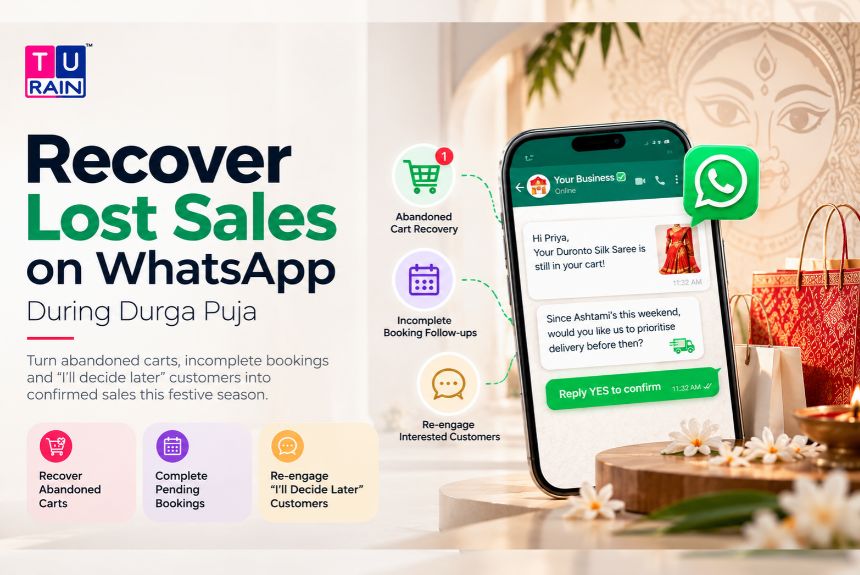
Something like: “Hi Priya, your Duronto Silk Saree is still saved in your cart. Since Ashtami’s this weekend, would you like us to prioritise delivery before then? Just reply YES, and we’ll lock it for you.”
Notice what that message avoids. No “LIMITED TIME OFFER!!” panic. No generic discount code blasted at everyone. It references the actual product, ties urgency to a real festival date, and asks for a one-word reply — which, conveniently, also reopens that 24-hour window if it had started to close.
Recovering Incomplete Bookings
Bookings fail for boring reasons, mostly. A form that asked for too many fields. A payment gateway that timed out. A moment of “let me check with my husband first” that never got revisited.
The fix is almost embarrassingly simple: reduce the remaining steps to almost nothing.
“Hi Rohit, we noticed your table booking for Saptami evening wasn’t completed. We’ve held your slot for the next 2 hours — just confirm here and we’ll lock it in, no need to refill the form.”
Two things matter in that message. It names the specific occasion (Saptami evening, not “your reservation”), and it removes the exact obstacle that likely caused the drop-off — refilling a form nobody enjoys refilling twice.
Recovering “I’ll Decide Later” Customers
This group already asked something. That’s a strong signal. Silence after an answered question usually means one of two things: they got busy, or a small doubt crept in that they never voiced.
Here, the smartest move is answering the doubt they didn’t ask out loud.
“Hi Ananya, just checking in on the kurta set you asked about earlier — happy to share a size chart or a quick video if that helps you decide. No pressure, just want to make sure you have what you need before the festive rush picks up.”
That last line does the real work. It signals you’re not chasing a sale. You’re removing a barrier. Ironically, that’s what closes more sales than pressure ever does.
Timing It Right During the Festival Window
Durga Puja compresses everyone’s attention into a handful of days — Shashthi through Dashami, roughly. Recovery messages sent too early feel premature. Sent too late, and the moment’s gone; the customer’s already bought elsewhere or lost the festive urgency entirely.
A workable rhythm looks like this:
- Within 2–4 hours of cart abandonment or drop-off — while intent is still fresh
- One follow-up, 24 hours later, only if the first got no response
- A final, gentler nudge closer to Ashtami or Navami, since that’s when festive urgency peaks for most retail and service categories
Beyond that, stop. A third or fourth message rarely converts. It just moves you from “helpful shop” to “the business that won’t leave me alone.”
What to Avoid
A few habits quietly kill recovery rates, even when the underlying offer is solid:
- Sending template-only messages inside the free window — if the customer already messaged you, use that open window for a personal reply, not a generic broadcast template
- Discounting immediately — training customers to abandon carts on purpose because they know a discount follows is a self-inflicted problem
- Ignoring opt-in rules — WhatsApp requires customer consent before you can message them proactively; buying a random number list and blasting festive offers isn’t just ineffective, it risks your business account getting flagged
- One-size-fits-all copy — a cart message and a booking message solving completely different problems shouldn’t read identically
A Small, Real Example
A local sweet shop in Kolkata ran into this exact pattern last Puja season. Dozens of customers filled pre-order forms for bhog and mishti platters, then never completed payment. Instead of a blanket “complete your order!” blast, the shop’s team sent a personal WhatsApp message naming the exact platter and the specific pickup date the customer had originally chosen, adding a one-line note that stock for Ashtami morning was limited.
Roughly a third of those stalled orders converted within a day. Not because of a discount. Because the message felt like a person remembering their order, not a system re-triggering a broadcast.
The Truth
Recovering lost sales during Durga Puja isn’t about clever copywriting tricks or aggressive discounting. It’s about catching people in that narrow, real window when their intent is still warm, and removing whatever small friction made them pause.
WhatsApp just happens to be the channel where that window is widest, cheapest, and most personal — provided you use it like a conversation, not a megaphone.
Your customers didn’t forget you. They got busy. A well-timed, well-worded nudge is often all it takes to remind them why they wanted this in the first place.
Disclaimer
Platform Policy & Automation Notice: This guide is for informational purposes and reflects best practices for WhatsApp marketing as of late 2026. Businesses must ensure they strictly comply with Meta’s Business Messaging Policy and the Digital Personal Data Protection (DPDP) Act. Specifically, adding an item to a cart or filling out half a booking form does not constitute an opt-in for WhatsApp messaging. You must capture explicit, active consent (e.g., a checked box at checkout) before sending any proactive recovery message. Additionally, proactive cart recovery messages must be submitted and billed as "Marketing" templates; attempting to misclassify them as "Utility" templates will lead to rejection or account penalties by Meta.
Frequently Asked Questions
Does an abandoned cart automatically open WhatsApp's free 24-hour service window?
No. A customer simply leaving items in a digital cart does not open the 24-hour free-form messaging window. That window only opens if the customer sends a message to your WhatsApp number first. Therefore, an automated abandoned cart reminder is considered a "business-initiated" message and must use a pre-approved Marketing template.
How can I recover lost sales with WhatsApp?
Businesses can use WhatsApp to reconnect with customers who showed purchase intent but didn't complete the transaction. This can include abandoned-cart reminders, incomplete-booking follow-ups and helpful messages for customers who made an enquiry but stopped responding.
Should I include a discount code in my very first abandoned cart message?
No, this is a common mistake. If you immediately offer a 10% discount 45 minutes after a cart is abandoned, you train your customers to intentionally abandon their carts just to get the lower price. Your first message should simply be a helpful, frictionless reminder. Save the discount code for a second follow-up message sent 24 hours later, and only send it to those who still haven't checked out.
How many recovery messages should I send before giving up?
A maximum of two to three messages spread over 48 hours is the industry best practice. For example: a polite reminder at 1 hour, a soft incentive at 24 hours, and a final expiring offer at 48 hours. Sending a fourth or fifth message drastically increases your block and spam report rates, which will severely damage your phone number's quality rating with Meta.
Can I use the free WhatsApp Business app to automate my abandoned cart messages?
No. The free WhatsApp Business app cannot automatically detect when a customer abandons a cart on your website. To trigger automated, timed recovery sequences based on website events (like Shopify or WooCommerce cart abandonments), you must use the paid WhatsApp Business Platform (API) integrated through a verified Business Solution Provider (BSP).
Can WhatsApp abandoned cart recovery be automated?
Your article distinguishes manual follow-up from website-triggered automation. Automated recovery based on e-commerce events requires an appropriate integration capable of detecting events such as abandoned checkouts.
Official Reference Links
- WhatsApp API Documentation – Message Template Categories: developers.facebook.com/docs/whatsapp/message-templates/guidelines
- Meta Business Help Center – WhatsApp Opt-In Requirements: business.whatsapp.com/policy
- Shopify Help Center – Abandoned Cart Recovery Strategies: help.shopify.com/en/manual/orders/abandoned-checkouts